Secure AI
Better visibility and control: Shining a light on shadow AI

Abe Carryl
Cloudflare
As AI becomes embedded in everyday work, security teams need a way to protect sensitive data without slowing adoption. This session explores how Cloudflare One data protection capabilities and secure AI controls can work together to provide visibility, policy enforcement, and practical guardrails across users, applications, and AI services. Learn how to reduce exposure, govern sensitive interactions, and create a more consistent control model for AI-driven workflows. The focus of this session is on real-world implementation patterns that help practitioners connect data protection and secure AI into a single, operational approach that supports both security and productivity.
0:03All right. Hi, everyone. My name is Abe Carroll, and I'm a product manager here at Cloudflare. I'm super excited to be speaking with you all today about Cloudflare One. For those of you who don't know, Cloudflare One is our suite of products that connects and protects users, applications, networks, data, and increasingly the agents connecting to those internal resources. I've been at Cloudflare for about six years. I've spent the majority of that time working on our networking and security products and now focus mostly on our data protection suite and specifically how we're applying that to AI and AI applications. Rob, do you want to introduce yourself real quick? Yeah, hi, Rob Dans. I am a Specialist Solutions Engineer. I've been with Cloudflare a little over four years. Started off in the core side, so I've done all the WAF and CDN things, and then I made a move over to the specialist team.
0:48And I support strategic accounts, enterprise, and even in my early days of the bid market commercials. So what we're going to do today is do a quick presentation about Cloudflare 1 and our SaaS suite in general, focusing on data protection. And then I'm going to pass it over to Rob, who's going to show you a little bit of a demo of what the admin and end-user experience actually looks like. So you can get a kind of glimpse of how you create some of these policies and the way that your end-users would experience those things. But before we do that, I want to level set a little bit and talk about some of the common pain points that we're typically trying to solve within this use case. And it really kind of bubbles into two different... buckets. The first is around discovery. And that really is all about trying to understand what AI applications and use cases our end users are trying to solve. Because ultimately, as security and network professionals, what we're trying to do is solve problems for end users and help enable them to do their best work.
1:39And right now, in most cases, that means using AI in order to accomplish things that you're trying to build. Around discovery, that normally comes with a whole host of different questions. So that's things like, have we reigned in shadow AI? What does our shadow AI? footprint look like? What kind of AI applications are users gravitating towards? For MCP services, it's who's using different MCP servers. Are those local? Are they remote? How are people handling authentication? Have we centralized that? Are they baking in API keys? Are these being downloaded from vetted resources? All those kinds of things. And how do I get visibility into that in general? And then of course, the last one is like, what are the actual prompts that users are sending to these applications themselves? Do those contain sensitive data? And how do I make sure that I have all? auditability and logging whenever those users are sending that data to these services.
2:26On the other side of that, you have the controls that you're trying to build. And that really is around how do I make sure that I'm thinking about which users need access to which tools? So as an example, you might have your technical team and they might need access to a very different set of AI applications and harnesses and models than maybe your non-technical team So how do I make those identity and device-based rules to make sure that those users can access only what they need to. And then on the other side of that, you have the actual data that is being sent to those applications and making sure that you're controlling that and locking that down. And then last but not least is actually logging and classifying the prompts themselves. And that's all in service of accelerating AI adoption. And one of the things that we talk about and that me and my team think a lot about is how do we make that as progressive and intuitive as possible? And really what I mean by that is how do we make sure that every policy that you're putting in place in your organization?
3:17is data-backed and that you have a good idea of what the impact of that policy will be first. There's all kinds of dashboards or reports and different ways that we kind of analyze the data that's going over your network to make sure that's something that's really easy for end users. And again, that's really what we built our Zero Trust services for. And every time that I think about our Zero Trust or a SASE platform, I think about it in three different pieces. So the first is around OnRamp. How do I get my traffic to the Cloudflare network? Within the Cloudflare network, I typically have two different things. So security policies and routing policies, who can access what, and then how do they ingress and egress? And on the other side of that, you have your off-ramp. So how does traffic get, how does it egress to the public internet or how do I ingress that to my private network?
4:04Within the Cloudflare network, there's a whole host of different benefits that we have there. And the first is visibility. So because all that traffic is going through a single pane of glass, You have a single enforcement point. We have visibility into every request that's going over the network, and we can help log and classify that for you. The second is around access controls, so we can help determine who can reach what. And then the next is data security. So the way that we think about data security is typically by defining pattern-matching rules for your data in your organization. So those are predominantly regular expressions that we use to match a particular pattern of user traffic that's going over the network. network. And then we'll do other things like algorithmic checks, like checksums. So if you see something like a credit card as an example, then we want to run a one on that to make sure that it actually is a credit card. And then we have different ways that we want to prove materiality of that data.
4:52So not just saying like, hey, this is a Visa credit card, but this is your Visa credit card. There's some really cool things that we're doing around external validation checks and integrating with Cloudflare workers, which you heard a lot about this morning, and just making sure that we have a really high degree of confidence in what the detection is. actually is. We then have prompt guardrails as well because we want to make sure that the way that users are interacting with these applications is safe. So obviously you don't want your end users to be able to say something like, what's the easiest way to lie on my expense report or how much do my coworkers make? So making sure there's some sort of safety controls around that as well. And then last but not least is actually logging the prompts themselves. So we do this in a really cool way, which I'll get to in just a second, but actually making sure that we can look at the individual content and intent.
5:39So the content being what you're sending to that model and making sure that that doesn't contain any sensitive information, but then the intent being what the user's trying to derive back from the model. I don't want a user sending an API key to the model, but I also don't want them asking for one to get sent back to me. So we want to make sure that we're protecting both sides of that transaction.
5:58So that all starts with what we call our application library. So we categorize hundreds and hundreds of different applications. within Cloudflare One, we take all the network intelligence that we see as Cloudflare, and then we break that into individual categories. We can then do really cool things with that. So if you look at Netflix as an example, rather than having to define Netflix, the application yourself, we have the 50 plus host names that are associated with that application. We then assign risk scores to those applications as well. So we look at things like funding, what are their training, or how do they, do they train on user data? What kind of certifications and accreditations do they have? have so that when you choose to block something within your organization, you have some level of assurance that you can give to your leadership team about why that decision was made. And then, of course, custom applications as well.
6:43So in the event that there is an application that we don't have defined or that you want to kind of diverge from that application's definition, then you can go and build that That actually is what we then use to power all of the classification that happens. And we build that into different reports like Shadow AI, Shadow MCP, Shadow IT reports, and you can start to see the users who are using certain applications as well as the data that's being transferred between those. MCP discovery works a little bit differently. So rather than just looking at the traffic at a really high level, we actually look at the body of the request as well. So we can look for things like resource and tool calls and then we can catalog those as well. So you can start seeing here all the applications that are in use in my organization. There are the MCP services that they're connecting to and then you can kind of control the state of that application as well.
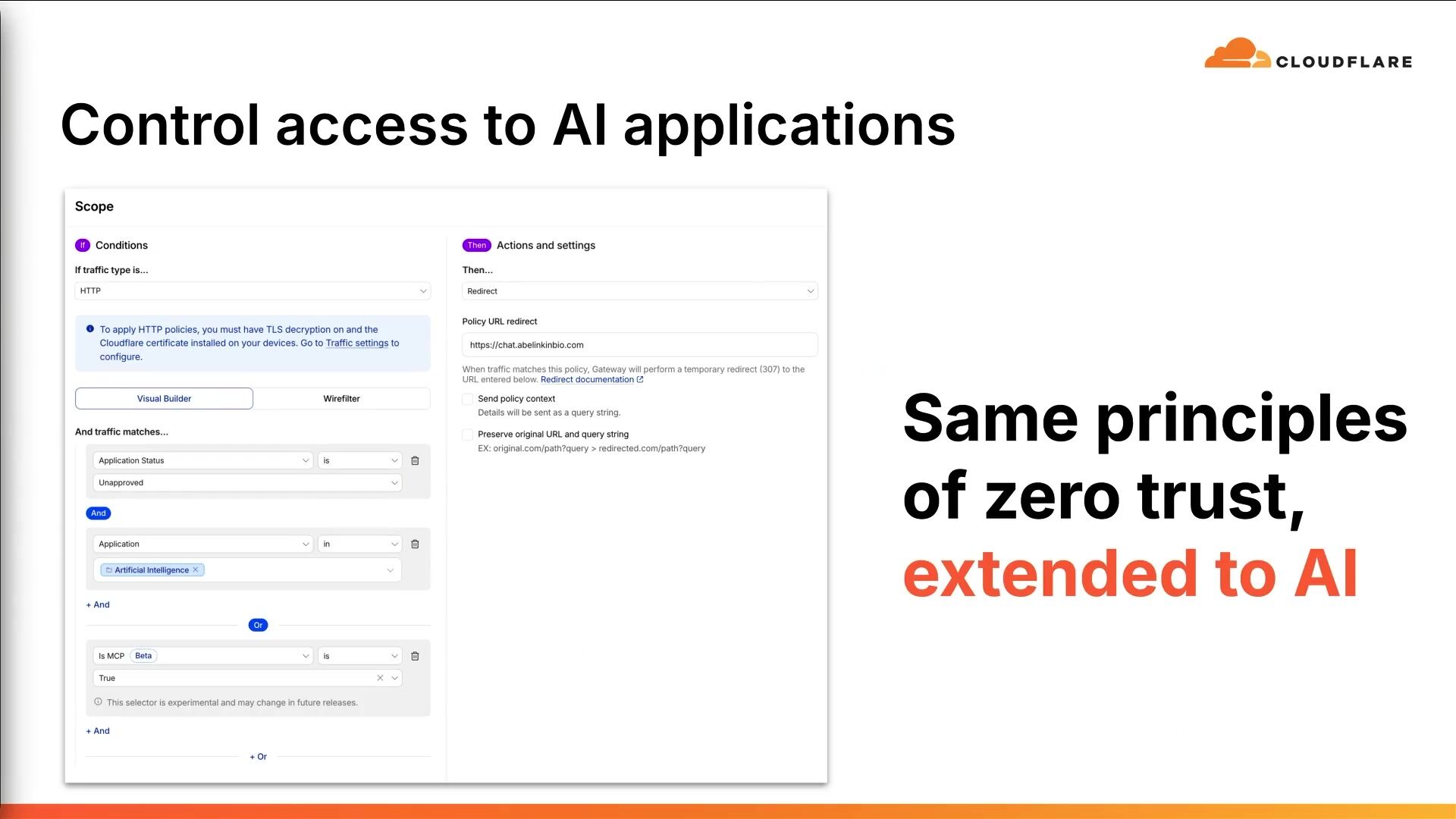
7:29So you can deem whether or not that application should be sanctioned or unsanctioned within your environment. And then that allows you to create policies, which Rob will show you in just a second. But at a really high level, you can create a policy that looks something like this. If the application status is unapproved and the application is in the category of artificial intelligence or is an MCP service, then I want to block that traffic. Or in this case, I say redirect that traffic to my agentic workspace, which Philip was just talking about in the last session. So you can take different actions like that and you can do that. really quick way to immediately start to get control over your environment once you do that you want to layer in data security policies so you can actually control the kind of information that you want to be sent to the applications that you do approve and we do that in a really interesting way so we actually break down the application itself and we look at kind of the micro interactions within that so things like transcribing audio or uploading a file or sending a prompt so you can have some granularity in the way that you want us to be looking at that traffic.
8:25And then I'll draw your attention specifically to the toggle on the far right, which says capture generative AI prompt content in logs. Again, so you can actually have visibility into everything that happens within those micro interactions in the applications that you've sanctioned within your environment. That's a kind of high level overview of some of the concepts that we're going to talk about today. And now I'll hand it over to Rob, who will walk you through the demo itself. You're right. Thank you. of course okay I just need to set where I know like I got one customer in here so but where's everybody at in terms of Cloudflare Zero Trust everybody familiar with our solution and okay some may not so let's let me let me kind of level set here for a second one thing I left out in the demo is the identity piece okay so we we will integrate with your IDP this is how we know who users are all right so the demo I'm going to do here is going to have our client on a device that's be connecting into Cloudflare, which enables us to do all the inspection.
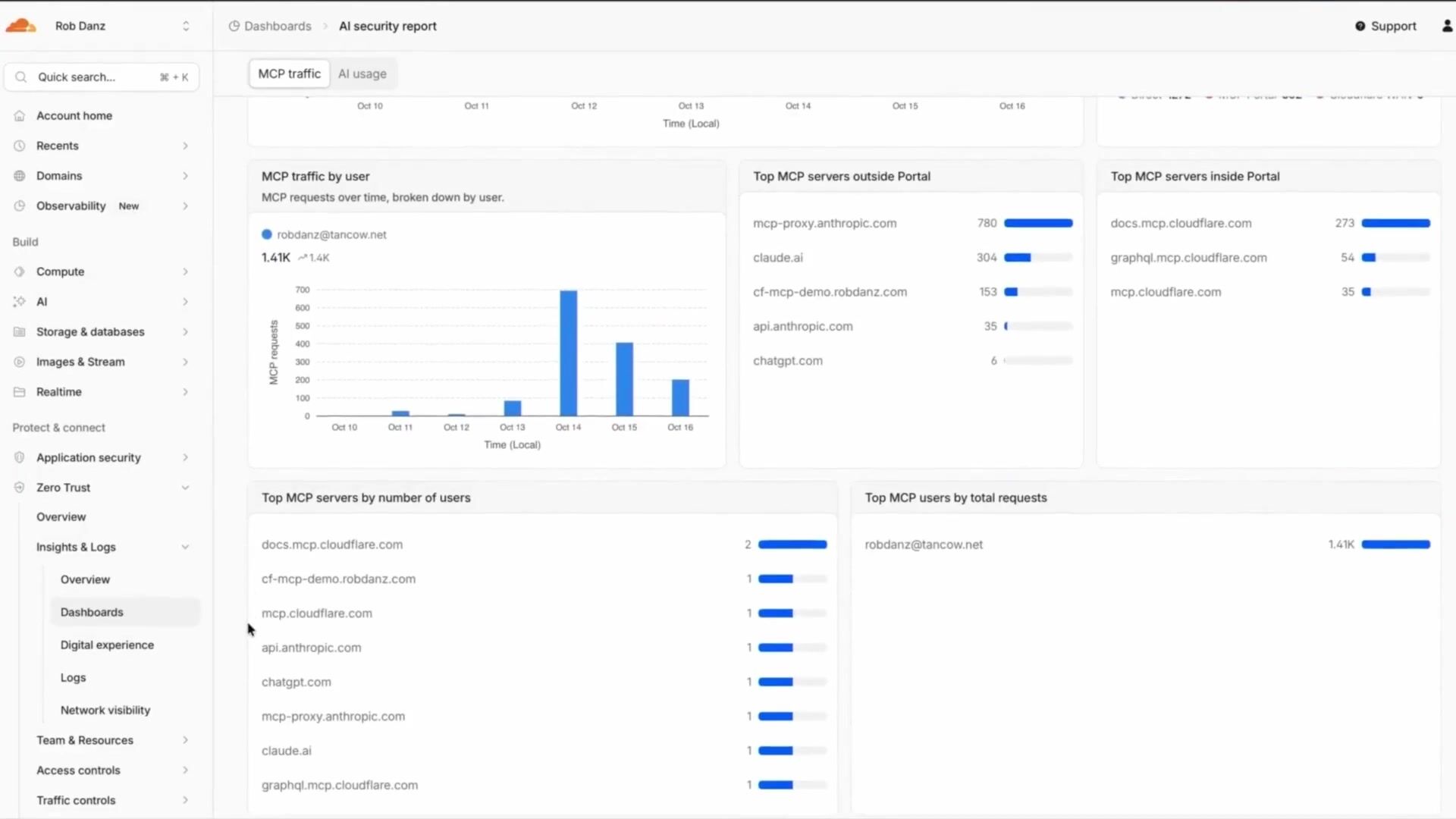
9:21All right, so let's give this a go. I'm just going to narrate what you're going to see here on the screen. So we're going to follow a see, decide, and protect workflow, okay? And this is going to start off in Cloudflare. We're going to go into our zero trust section. I'm going to go down to insights and logs and into our dashboards. Okay, we're going to make use of the AI security report and also the Sabbath. analytics shadow it report okay we dig into this and we've got our mcp traffic section here this is showing me in my account number of requests we have number of users over the last seven days actually and then what are the distinct mcp servers how are they being on ramped when warp etc at traffic by user mcp servers outside of a portal is like public ones and then i've got some inside portal ones as well, and a list of all these that are in use.
10:21I can use these later on in the policy definitions. When I go to the AI usage section, this is showing me the top five AI applications that were in use that are being consumed by my users.
10:34Also over the last seven days, it's showing me volume of data transferred. Again, the MCP servers by user count.
10:44This is the... the C part, right? So now to go into the decide, I'm going to go back into my dashboards and I'm going to go to my SaaS analytics. This shortcuts the application library thing that he showed you. I go here and I set my application statuses here. And I'm going to, this is, these are all the SaaS applications that have been consumed by my users over the last 24 hours. I'm going to change this to seven days to match my last report. And since we're working with the AI, I'm going to change my application types here on this filter to AI. And here are the applications that we saw. All of these are in unreviewed status. And this is where I can start to make my decisions about these categorizations of do I allow these or not?
11:37So we will quickly here start setting these.
11:44get there okay
11:47okay i'm going to mark this one as approved i will set deep seek to unapproved
11:57you'll do perplexity i'm going to leave this as in review i should have sped this up to be honest um claude here we're going to do supported and we'll do or approved and we'll do that for copilot and gemini as well Now I've quickly went through and made these decisions. We can use the application libraries on another slide to help us make these decisions. Okay, so I can click in on, these are in the application library and if we go into our Zero Trust Dashboard down in Teams and Resources, right there, and we go to application library, these are all the applications Abe was referring to. And I'm gonna go up here and I'm gonna mistype Deep Seek. And I'm going to backspace here and fix it.
12:42If you can't laugh at yourself, folks, this is me doing this. So if we look at this, I've got, there's the app confidence score. We'll have a blade that pops out here that will show you some of the security ranking compliance things that Aiden talked about. Not ISO compliant. Can't opt out of, that's the next one's opting out of training. They're marked pretty low. If we go to. the Gen AI confidence score, you'll see here, not ISO 42001 compliance. You can't opt out of training. We've scored them a two out of five. So I've decided this is unapproved. Okay. Again, this is part of all of my decision parts. All right. So after doing this, now we need to create the policies. Okay. Oh no, sorry. You can get more details here. If I go to DeepSeek, he had talked about the...
13:34host names to find the application. You can find those all here. We can see what past usage for the application was. And then a summary of that compliance report that we clicked into.
13:48Right. And now we're going to go over to putting policies in action. Get there.
13:58Okay. We're going to go into my traffic controls now, and we're going to go into our firewall policies and here we're going to go into htdp i've recreated these first three
14:12and we're going to go look at the first one for our block unsanctioned very easy policy if it's ai and it's unimproved i'm going to block it i'm also going to send it to a a custom block page which i'm hosting on cloudflare too and when we say that policy context, there's some information about that block that goes along with it that makes it easy to customize this page. Okay. And you'll see this in the user experience section here in just a second. You can also send, you know, the, uh, we'll, we'll talk later about the prompt logging, but you can send the DLP matches to your SIM also. So for this one, if it's AI and it's not approved, we're going to send this to isolation. And when it's in isolation, The policies I'm applying here is that you can copy out of it, but I'm not going to allow you paste.
15:03If you're not familiar with Cloudflare's browser isolation, it's a policy action that we can have, and it's a headless Chromium incident that spins up on the Cloudflare edge, and it streams the view back to the end user. So now I can apply additional policies and controls in that workflow that I couldn't do, just it was running in their own browser.
15:24Okay, if we're going to go... So, explain that faster than I did.
15:39There we go.
15:42All right, we're going to go back to our firewall policies. This is in the lines of the, okay, what do we, we want to protect the allowed stuff. So now this one is, if this is AI and it matches our finance. profiles where I'm looking for credit cards and things specifically on this. Then I'm going to want to block this. Okay. I've done this, this specific one to just for, for uploads. You can, again, you can log the payload. You can send it to storage. There's another, and we can talk in a other session about logging the prompts as well in the response. But here I'm sending this as block page. I'm also going to send a notification to the client itself because of it. this happens in a page where it doesn't refresh, you need to let the user know that something happened, right? If the page doesn't refresh to a block page, I need to give them some sort of notification.
16:29This will be a little toast notification that pops up in their system track. Now we're going into the end user view. So this is my client. I'm going to connect this. You can force this to always on in your environment. I had this DeepSeek page already preloaded, but now I'm going to refresh this page now that I'm connected to CloudFlare. And I'm going to be taken to the block page. that we've redirected to. And I pass that additional context, give myself information about user insights. And I've also given the user a list of approved things they're allowed to go to. So we click on Claude. They can go to Claude and they can interact with the model as normal. Throw me a dad joke. Okay, skeletons fight each other because they don't have the guts. Here, I'm just showing you that we're gonna do a copy and paste.
17:15Like I can interact with this browser as normal.
17:20everything works, okay?
17:24What we're going to do next is look at where it's that in review, okay, where we're going to isolate the output. So we've already looked at blocking things. We've looked at allowing things. Now, load perplexity, which you remember was in review, it pulls up. There's no indication that this is being isolated. I can interact with the model like I normally would. Your aunt said, tell me a dad joke again.
17:54But running in browser isolation, I remember I said that I was allowed to copy things, but I'm not allowed to paste. So I'll right-click here. The context menu actually is different when you're in browser isolation. That's one of the ways somebody could tell. There's no paste action. And if I control V this, they're blocked. So this is doing the... prevent the exfil okay all right so we looked at locking unapproved things redirecting people to or advising people the success the good things we have you know allowed them to or you know sanction apps we've isolated others let's look at the data protection okay so let's look at dlp things so we've got the finance stuff in there so i'm going to go over to dlp test.com and we're going to go pick up some sample data.
18:42I'm going to go pick up these credit card numbers here and we're just going to copy this and we go back to Claude. Remember we applied these DLP to all of them so I'm going to paste this in. And then I'm going to get a toast notification on there that says this has been blocked. Then if I go to the isolated one that we were allowing before, shouldn't we? I can't paste. that whole thing. But if I were to type in a known test credit card number, I'll click go, and it's intercepted. It actually never makes it to the model. So what we're doing here, we're keeping the data from actually getting to the model in the first place.
19:31From an admin standpoint, we're going to flip back over to Cloudflare, and you can see what's available here. So we're going to go back into our dashboard. This time, I'm gonna go into Insights and Logs.
19:44I'm gonna go to SilverTrust, Insights and Logs. And we're gonna go to Logs this time. Let me go over to my HTTP request logs. Here, I'm just gonna apply a quick filter to look at my block traffic. Okay, I'm gonna set my action to block.
20:01And these are all the things you just saw us go through. So Claude A was blocked because of the DLP profile. perplexity was blocked down there at the bottom you can see the block from the sanction if i drill into an individual record this is all the data in that record these are all the things that get sent to your sim okay optionally you can add on sending prompt you can send dlp as well and store that near sim and decode later that's the walk that's the that's the walk this is not hard this is like we we talked about how Cloudflare is the easiest to deploy and getting those policies in place. It really is.
20:43If I were to sum this up, though, if you're already familiar with Cloudflare and you have this in place, you're just adding on to what you have. So extend what you have. Just start with looking at your logs and seeing what's there. And then use the same things you're doing for your SWIG and everything else to just extend this to the AI usage.
21:03I said this at the beginning, this is really just categorizing things into see, decide, and protect. Start with your logs, know what's going on, decide your policies, and then block the bad things and then control the good things of what they can do and what they can send out. Thank you all so much for coming.
Abe Carryl
Cloudflare
Simon Thorpe
Cloudflare
Gérard Zapf
Cloudflare
Be the first to know when registration opens and the agenda goes live.
---
title: "Connecting Cloudflare One data protection and secure AI"
url: "https://www.cloudflare.com/connect/2026/session/connecting-cloudflare-one-data-protection-and-secure-ai"
year: 2026
---

# Connecting Cloudflare One data protection and secure AI

[Watch session](https://www.cloudflare.com/connect/2026/session/connecting-cloudflare-one-data-protection-and-secure-ai)

## Session details

- **Track:** Secure AI
- **Topics:** AI security & audit, Data security & privacy
- **Solution areas:** SASE & Workspace Security (Cloudflare One)

## About this session

As AI becomes embedded in everyday work, security teams need a way to protect sensitive data without slowing adoption. This session explores how Cloudflare One data protection capabilities and secure AI controls can work together to provide visibility, policy enforcement, and practical guardrails across users, applications, and AI services. Learn how to reduce exposure, govern sensitive interactions, and create a more consistent control model for AI-driven workflows. The focus of this session is on real-world implementation patterns that help practitioners connect data protection and secure AI into a single, operational approach that supports both security and productivity.

## Speakers

- [Abe Carryl](https://www.cloudflare.com/connect/speakers/2463607) — Senior Manager, Product Management, Cloudflare
- [Rob Danz](https://www.cloudflare.com/connect/speakers/2490383) — Principal Specialist Solutions Engineer, Cloudflare

## Transcript

[0:03] All right. Hi, everyone. My name is Abe Carroll, and I'm a product manager here at Cloudflare. I'm super excited to be speaking with you all today about Cloudflare One. For those of you who don't know, Cloudflare One is our suite of products that connects and protects users, applications, networks, data, and increasingly the agents connecting to those internal resources. I've been at Cloudflare for about six years. I've spent the majority of that time working on our networking and security products and now focus mostly on our data protection suite and specifically how we're applying that to AI and AI applications. Rob, do you want to introduce yourself real quick? Yeah, hi, Rob Dans. I am a Specialist Solutions Engineer. I've been with Cloudflare a little over four years. Started off in the core side, so I've done all the WAF and CDN things, and then I made a move over to the specialist team.

[0:48] And I support strategic accounts, enterprise, and even in my early days of the bid market commercials. So what we're going to do today is do a quick presentation about Cloudflare 1 and our SaaS suite in general, focusing on data protection. And then I'm going to pass it over to Rob, who's going to show you a little bit of a demo of what the admin and end-user experience actually looks like. So you can get a kind of glimpse of how you create some of these policies and the way that your end-users would experience those things. But before we do that, I want to level set a little bit and talk about some of the common pain points that we're typically trying to solve within this use case. And it really kind of bubbles into two different... buckets. The first is around discovery. And that really is all about trying to understand what AI applications and use cases our end users are trying to solve. Because ultimately, as security and network professionals, what we're trying to do is solve problems for end users and help enable them to do their best work.

[1:39] And right now, in most cases, that means using AI in order to accomplish things that you're trying to build. Around discovery, that normally comes with a whole host of different questions. So that's things like, have we reigned in shadow AI? What does our shadow AI? footprint look like? What kind of AI applications are users gravitating towards? For MCP services, it's who's using different MCP servers. Are those local? Are they remote? How are people handling authentication? Have we centralized that? Are they baking in API keys? Are these being downloaded from vetted resources? All those kinds of things. And how do I get visibility into that in general? And then of course, the last one is like, what are the actual prompts that users are sending to these applications themselves? Do those contain sensitive data? And how do I make sure that I have all? auditability and logging whenever those users are sending that data to these services.

[2:26] On the other side of that, you have the controls that you're trying to build. And that really is around how do I make sure that I'm thinking about which users need access to which tools? So as an example, you might have your technical team and they might need access to a very different set of AI applications and harnesses and models than maybe your non-technical team So how do I make those identity and device-based rules to make sure that those users can access only what they need to. And then on the other side of that, you have the actual data that is being sent to those applications and making sure that you're controlling that and locking that down. And then last but not least is actually logging and classifying the prompts themselves. And that's all in service of accelerating AI adoption. And one of the things that we talk about and that me and my team think a lot about is how do we make that as progressive and intuitive as possible? And really what I mean by that is how do we make sure that every policy that you're putting in place in your organization?

[3:17] is data-backed and that you have a good idea of what the impact of that policy will be first. There's all kinds of dashboards or reports and different ways that we kind of analyze the data that's going over your network to make sure that's something that's really easy for end users. And again, that's really what we built our Zero Trust services for. And every time that I think about our Zero Trust or a SASE platform, I think about it in three different pieces. So the first is around OnRamp. How do I get my traffic to the Cloudflare network? Within the Cloudflare network, I typically have two different things. So security policies and routing policies, who can access what, and then how do they ingress and egress? And on the other side of that, you have your off-ramp. So how does traffic get, how does it egress to the public internet or how do I ingress that to my private network?

[4:04] Within the Cloudflare network, there's a whole host of different benefits that we have there. And the first is visibility. So because all that traffic is going through a single pane of glass, You have a single enforcement point. We have visibility into every request that's going over the network, and we can help log and classify that for you. The second is around access controls, so we can help determine who can reach what. And then the next is data security. So the way that we think about data security is typically by defining pattern-matching rules for your data in your organization. So those are predominantly regular expressions that we use to match a particular pattern of user traffic that's going over the network. network. And then we'll do other things like algorithmic checks, like checksums. So if you see something like a credit card as an example, then we want to run a one on that to make sure that it actually is a credit card. And then we have different ways that we want to prove materiality of that data.

[4:52] So not just saying like, hey, this is a Visa credit card, but this is your Visa credit card. There's some really cool things that we're doing around external validation checks and integrating with Cloudflare workers, which you heard a lot about this morning, and just making sure that we have a really high degree of confidence in what the detection is. actually is. We then have prompt guardrails as well because we want to make sure that the way that users are interacting with these applications is safe. So obviously you don't want your end users to be able to say something like, what's the easiest way to lie on my expense report or how much do my coworkers make? So making sure there's some sort of safety controls around that as well. And then last but not least is actually logging the prompts themselves. So we do this in a really cool way, which I'll get to in just a second, but actually making sure that we can look at the individual content and intent.

[5:39] So the content being what you're sending to that model and making sure that that doesn't contain any sensitive information, but then the intent being what the user's trying to derive back from the model. I don't want a user sending an API key to the model, but I also don't want them asking for one to get sent back to me. So we want to make sure that we're protecting both sides of that transaction.

[5:58] So that all starts with what we call our application library. So we categorize hundreds and hundreds of different applications. within Cloudflare One, we take all the network intelligence that we see as Cloudflare, and then we break that into individual categories. We can then do really cool things with that. So if you look at Netflix as an example, rather than having to define Netflix, the application yourself, we have the 50 plus host names that are associated with that application. We then assign risk scores to those applications as well. So we look at things like funding, what are their training, or how do they, do they train on user data? What kind of certifications and accreditations do they have? have so that when you choose to block something within your organization, you have some level of assurance that you can give to your leadership team about why that decision was made. And then, of course, custom applications as well.

[6:43] So in the event that there is an application that we don't have defined or that you want to kind of diverge from that application's definition, then you can go and build that That actually is what we then use to power all of the classification that happens. And we build that into different reports like Shadow AI, Shadow MCP, Shadow IT reports, and you can start to see the users who are using certain applications as well as the data that's being transferred between those. MCP discovery works a little bit differently. So rather than just looking at the traffic at a really high level, we actually look at the body of the request as well. So we can look for things like resource and tool calls and then we can catalog those as well. So you can start seeing here all the applications that are in use in my organization. There are the MCP services that they're connecting to and then you can kind of control the state of that application as well.

[7:29] So you can deem whether or not that application should be sanctioned or unsanctioned within your environment. And then that allows you to create policies, which Rob will show you in just a second. But at a really high level, you can create a policy that looks something like this. If the application status is unapproved and the application is in the category of artificial intelligence or is an MCP service, then I want to block that traffic. Or in this case, I say redirect that traffic to my agentic workspace, which Philip was just talking about in the last session. So you can take different actions like that and you can do that. really quick way to immediately start to get control over your environment once you do that you want to layer in data security policies so you can actually control the kind of information that you want to be sent to the applications that you do approve and we do that in a really interesting way so we actually break down the application itself and we look at kind of the micro interactions within that so things like transcribing audio or uploading a file or sending a prompt so you can have some granularity in the way that you want us to be looking at that traffic.

[8:25] And then I'll draw your attention specifically to the toggle on the far right, which says capture generative AI prompt content in logs. Again, so you can actually have visibility into everything that happens within those micro interactions in the applications that you've sanctioned within your environment. That's a kind of high level overview of some of the concepts that we're going to talk about today. And now I'll hand it over to Rob, who will walk you through the demo itself. You're right. Thank you. of course okay I just need to set where I know like I got one customer in here so but where's everybody at in terms of Cloudflare Zero Trust everybody familiar with our solution and okay some may not so let's let me let me kind of level set here for a second one thing I left out in the demo is the identity piece okay so we we will integrate with your IDP this is how we know who users are all right so the demo I'm going to do here is going to have our client on a device that's be connecting into Cloudflare, which enables us to do all the inspection.

[9:21] All right, so let's give this a go. I'm just going to narrate what you're going to see here on the screen. So we're going to follow a see, decide, and protect workflow, okay? And this is going to start off in Cloudflare. We're going to go into our zero trust section. I'm going to go down to insights and logs and into our dashboards. Okay, we're going to make use of the AI security report and also the Sabbath. analytics shadow it report okay we dig into this and we've got our mcp traffic section here this is showing me in my account number of requests we have number of users over the last seven days actually and then what are the distinct mcp servers how are they being on ramped when warp etc at traffic by user mcp servers outside of a portal is like public ones and then i've got some inside portal ones as well, and a list of all these that are in use.

[10:21] I can use these later on in the policy definitions. When I go to the AI usage section, this is showing me the top five AI applications that were in use that are being consumed by my users.

[10:34] Also over the last seven days, it's showing me volume of data transferred. Again, the MCP servers by user count.

[10:44] This is the... the C part, right? So now to go into the decide, I'm going to go back into my dashboards and I'm going to go to my SaaS analytics. This shortcuts the application library thing that he showed you. I go here and I set my application statuses here. And I'm going to, this is, these are all the SaaS applications that have been consumed by my users over the last 24 hours. I'm going to change this to seven days to match my last report. And since we're working with the AI, I'm going to change my application types here on this filter to AI. And here are the applications that we saw. All of these are in unreviewed status. And this is where I can start to make my decisions about these categorizations of do I allow these or not?

[11:37] So we will quickly here start setting these.

[11:44] get there okay

[11:47] okay i'm going to mark this one as approved i will set deep seek to unapproved

[11:57] you'll do perplexity i'm going to leave this as in review i should have sped this up to be honest um claude here we're going to do supported and we'll do or approved and we'll do that for copilot and gemini as well Now I've quickly went through and made these decisions. We can use the application libraries on another slide to help us make these decisions. Okay, so I can click in on, these are in the application library and if we go into our Zero Trust Dashboard down in Teams and Resources, right there, and we go to application library, these are all the applications Abe was referring to. And I'm gonna go up here and I'm gonna mistype Deep Seek. And I'm going to backspace here and fix it.

[12:42] If you can't laugh at yourself, folks, this is me doing this. So if we look at this, I've got, there's the app confidence score. We'll have a blade that pops out here that will show you some of the security ranking compliance things that Aiden talked about. Not ISO compliant. Can't opt out of, that's the next one's opting out of training. They're marked pretty low. If we go to. the Gen AI confidence score, you'll see here, not ISO 42001 compliance. You can't opt out of training. We've scored them a two out of five. So I've decided this is unapproved. Okay. Again, this is part of all of my decision parts. All right. So after doing this, now we need to create the policies. Okay. Oh no, sorry. You can get more details here. If I go to DeepSeek, he had talked about the...

[13:34] host names to find the application. You can find those all here. We can see what past usage for the application was. And then a summary of that compliance report that we clicked into.

[13:48] Right. And now we're going to go over to putting policies in action. Get there.

[13:58] Okay. We're going to go into my traffic controls now, and we're going to go into our firewall policies and here we're going to go into htdp i've recreated these first three

[14:12] and we're going to go look at the first one for our block unsanctioned very easy policy if it's ai and it's unimproved i'm going to block it i'm also going to send it to a a custom block page which i'm hosting on cloudflare too and when we say that policy context, there's some information about that block that goes along with it that makes it easy to customize this page. Okay. And you'll see this in the user experience section here in just a second. You can also send, you know, the, uh, we'll, we'll talk later about the prompt logging, but you can send the DLP matches to your SIM also. So for this one, if it's AI and it's not approved, we're going to send this to isolation. And when it's in isolation, The policies I'm applying here is that you can copy out of it, but I'm not going to allow you paste.

[15:03] If you're not familiar with Cloudflare's browser isolation, it's a policy action that we can have, and it's a headless Chromium incident that spins up on the Cloudflare edge, and it streams the view back to the end user. So now I can apply additional policies and controls in that workflow that I couldn't do, just it was running in their own browser.

[15:24] Okay, if we're going to go... So, explain that faster than I did.

[15:39] There we go.

[15:42] All right, we're going to go back to our firewall policies. This is in the lines of the, okay, what do we, we want to protect the allowed stuff. So now this one is, if this is AI and it matches our finance. profiles where I'm looking for credit cards and things specifically on this. Then I'm going to want to block this. Okay. I've done this, this specific one to just for, for uploads. You can, again, you can log the payload. You can send it to storage. There's another, and we can talk in a other session about logging the prompts as well in the response. But here I'm sending this as block page. I'm also going to send a notification to the client itself because of it. this happens in a page where it doesn't refresh, you need to let the user know that something happened, right? If the page doesn't refresh to a block page, I need to give them some sort of notification.

[16:29] This will be a little toast notification that pops up in their system track. Now we're going into the end user view. So this is my client. I'm going to connect this. You can force this to always on in your environment. I had this DeepSeek page already preloaded, but now I'm going to refresh this page now that I'm connected to CloudFlare. And I'm going to be taken to the block page. that we've redirected to. And I pass that additional context, give myself information about user insights. And I've also given the user a list of approved things they're allowed to go to. So we click on Claude. They can go to Claude and they can interact with the model as normal. Throw me a dad joke. Okay, skeletons fight each other because they don't have the guts. Here, I'm just showing you that we're gonna do a copy and paste.

[17:15] Like I can interact with this browser as normal.

[17:20] everything works, okay?

[17:24] What we're going to do next is look at where it's that in review, okay, where we're going to isolate the output. So we've already looked at blocking things. We've looked at allowing things. Now, load perplexity, which you remember was in review, it pulls up. There's no indication that this is being isolated. I can interact with the model like I normally would. Your aunt said, tell me a dad joke again.

[17:54] But running in browser isolation, I remember I said that I was allowed to copy things, but I'm not allowed to paste. So I'll right-click here. The context menu actually is different when you're in browser isolation. That's one of the ways somebody could tell. There's no paste action. And if I control V this, they're blocked. So this is doing the... prevent the exfil okay all right so we looked at locking unapproved things redirecting people to or advising people the success the good things we have you know allowed them to or you know sanction apps we've isolated others let's look at the data protection okay so let's look at dlp things so we've got the finance stuff in there so i'm going to go over to dlp test.com and we're going to go pick up some sample data.

[18:42] I'm going to go pick up these credit card numbers here and we're just going to copy this and we go back to Claude. Remember we applied these DLP to all of them so I'm going to paste this in. And then I'm going to get a toast notification on there that says this has been blocked. Then if I go to the isolated one that we were allowing before, shouldn't we? I can't paste. that whole thing. But if I were to type in a known test credit card number, I'll click go, and it's intercepted. It actually never makes it to the model. So what we're doing here, we're keeping the data from actually getting to the model in the first place.

[19:31] From an admin standpoint, we're going to flip back over to Cloudflare, and you can see what's available here. So we're going to go back into our dashboard. This time, I'm gonna go into Insights and Logs.

[19:44] I'm gonna go to SilverTrust, Insights and Logs. And we're gonna go to Logs this time. Let me go over to my HTTP request logs. Here, I'm just gonna apply a quick filter to look at my block traffic. Okay, I'm gonna set my action to block.

[20:01] And these are all the things you just saw us go through. So Claude A was blocked because of the DLP profile. perplexity was blocked down there at the bottom you can see the block from the sanction if i drill into an individual record this is all the data in that record these are all the things that get sent to your sim okay optionally you can add on sending prompt you can send dlp as well and store that near sim and decode later that's the walk that's the that's the walk this is not hard this is like we we talked about how Cloudflare is the easiest to deploy and getting those policies in place. It really is.

[20:43] If I were to sum this up, though, if you're already familiar with Cloudflare and you have this in place, you're just adding on to what you have. So extend what you have. Just start with looking at your logs and seeing what's there. And then use the same things you're doing for your SWIG and everything else to just extend this to the AI usage.

[21:03] I said this at the beginning, this is really just categorizing things into see, decide, and protect. Start with your logs, know what's going on, decide your policies, and then block the bad things and then control the good things of what they can do and what they can send out. Thank you all so much for coming.

## Related sessions

- [Better visibility and control: Shining a light on shadow AI](https://www.cloudflare.com/connect/2026/session/better-visibility-and-control-shining-a-light-on-shadow-ai)
- [The integrated Cloudflare stack for trusted AI adoption](https://www.cloudflare.com/connect/2026/session/the-integrated-cloudflare-stack-for-trusted-ai-adoption)
- [Securing agentic harnesses: Control, visibility, and safe tool use](https://www.cloudflare.com/connect/2026/session/securing-agentic-harnesses-control-visibility-and-safe-tool-use)

## More from Connect

- [All sessions](https://www.cloudflare.com/connect/)
- [Get notified for Connect 2027](https://www.cloudflare.com/connect#2027)

