Web Performance & Frameworks
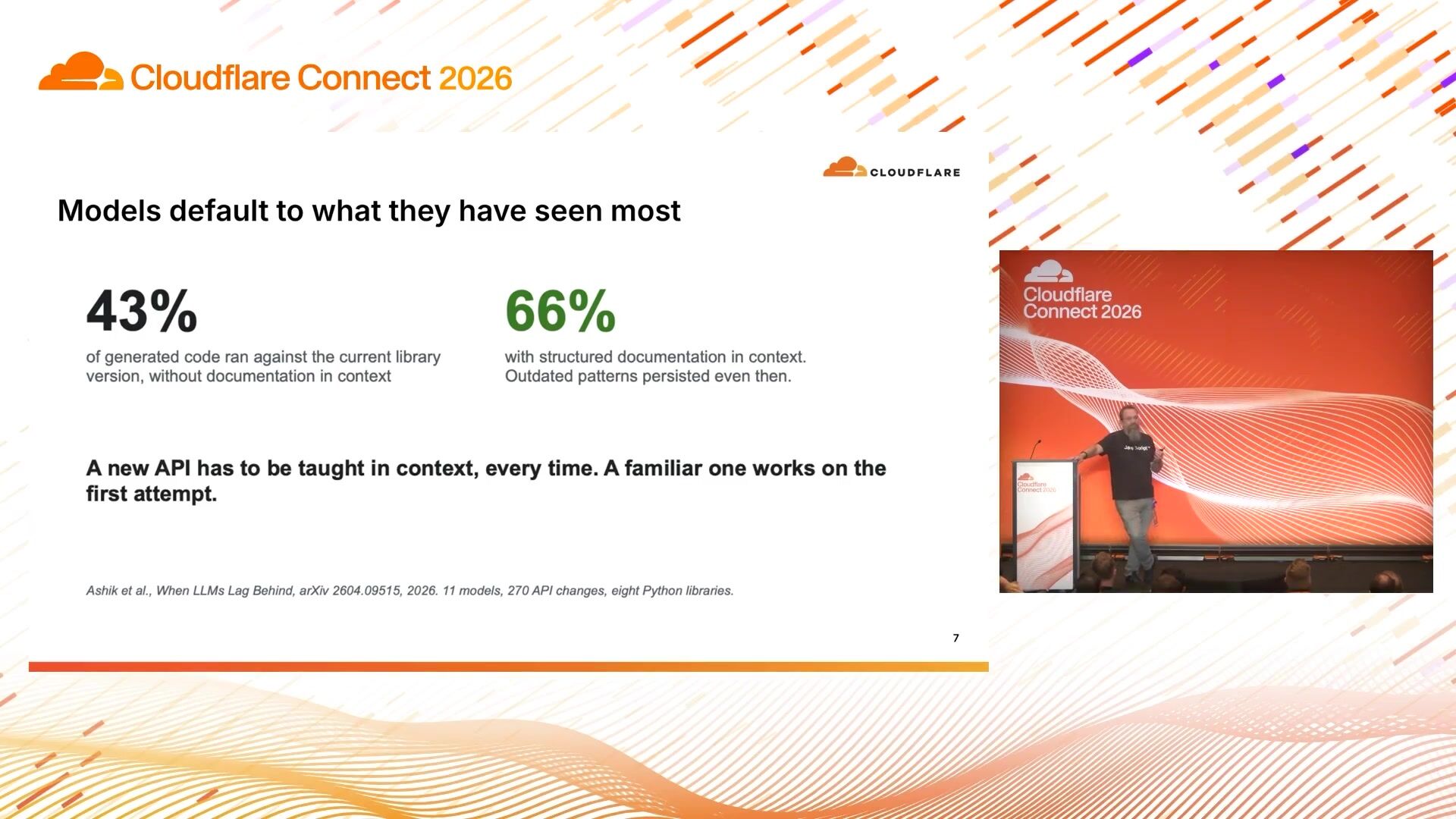
A runtime for developers and their agents

James Snell
Cloudflare
0:03I'm Matt. I'm a principal engineer at Cloudflare. I'm on the Astro core team and I'm going to talk about what I've been building. So I've been on the Astro core team for a few years and we've had a running joke for a long time that we need to build a CMS because it sort of, it feels like a missing part of Astro. that Astro kind of needs a CMS in there. But every time it came up in planning, people would laugh and we'd move on and we'd not do anything. I started working at Cloudflare and you just realized exactly a year ago today. And what I was surprised to find is that when I arrived here, that it was also a running joke here, that we've wanted to build a CMS for ages and it wasn't possible before.
0:56I got, they're seen as me in January. I wasn't in the hills there, but I get a DM from Dane, our CTO. Apparently, I find out later that he was actually with, he was with Matthew, our CEO at the same time. So this is my imaginary thing of where they are. And he said, just, can you build a new WordPress for us? And surprisingly, obviously, I'd been thinking about this quite a lot. So I- I actually immediately said yes. And then, of course, I was like, oh, my God, what am I going to do here?
1:31So the first big question there, though, is if you are building a new WordPress in 2026, what does it look like? Because it certainly doesn't look like what WordPress did 20 years ago because it's a different world.
1:46This is our answer to what we think it looks like. You know, this is just one way. This is M-dash, if anybody's not seen it before. This is a full stack CMS in TypeScript, runs on Astro, can be deployed to Cloudflow workers or Node. It's open source. And I started on this in January with me and lots of agents and a big token budget and a deadline of seeing what I could build in two months. And... we went to our first public alpha on the 1st of April and then spent the next six months trying to explain to people that this wasn't a joke. It was actually real. We've really created this thing.
2:32And then we went to 1.0 just a few weeks ago. So hopefully this is our answer to it being real. It is real.
2:41If you want to know about more details about how I built it and how we're managing it as an open source project, come and see my talk. tomorrow i'm doing a system sketch where i'm talking about the actual behind it today i'm going to talk about what it is and why it's shaped the way that it is so um it's this is surprisingly controversial but um i like wordpress um i've i've said this to lots of wordpress people and they're quite surprised um but it's obviously it's got a lot of issues but i think we've got some really important things right and there's you know it doesn't become such a popular thing and so stick around 20 years without getting some stuff pretty right and i think that there are three big things that it got right first anybody can just go in there and edit it's like you can get in there you can type it looks you know kind of vaguely like what you're getting and it comes out at the end and you don't need to talk to a dev and that is you know that is great and then but the real killer i think is that if it doesn't do something you want it to do there's tens of thousands of plugins out there that can make it do whatever you want and so that one is absolutely crucial as well and then when you finish when you publish you've got a site right there you don't need to build an extra site that talks to it or anything you've just got the whole thing there and i think that those are the three things that i think that really make wordpress amazing and that's what i want to try and try to capture in mdash but i didn't want to capture everything from wordpress so there's a lot of stuff with wordpress
4:12that just doesn't make sense in 2026. So in WordPress, all of everything is in the same trust boundary. So your database, all of your users, your front, all of your code, and also all of your plugins. Every plugin you run is running in the same trust zone as all of the rest of the code. So if your gallery plugin, can access your user table and it can exfiltrate all of your password hashes if it really wants to and obviously most plugins don't most plugins are legit but when you've got 60 000 plugins that's a lot of plugins that you need to trust so it's not really surprising that that's why the um that's why the uh that's why the uh most of the um issues most of the vulnerability you get in work WordPress, like 90 % plus of them are in plugins.
5:08The core WordPress core, generally pretty solid, doesn't get many vulnerabilities in it. And the problem is you just need one WordPress plugin to be owned or malicious, and you've lost a lot. So that was one thing we wanted to solve.
5:28And so what we've done with MDash is we've kept these things as separate. So we've kept the core the core things that you want to store in your cms all your content mainly in all of the configuration and everything and we've given you an edit admin interface which is the bit that i've shown before that looks familiar to any um any wordpress admin that stuff you know talks talks to it the thing that is different for 2026 is that mdash has been built with agents as first class citizens from from the start so the agent doesn't need to use the admin and it doesn't need to like have itself set up for an api and you don't need to install plugins or anything it's got built in mcp it can do anything that a human can do um and it's got like lots of affordances to make it work better in there while plugins don't get access to much at all except where it's been specifically granted so It is sandboxed.
6:34You tell them exactly what they have access to, and that's all they get. I'll go into that a little bit more in a moment. And then the site itself is just an Astro site. So if anybody has used Astro, they can use emdash. They can build an emdash site. Basically, it's exactly the same. The interfaces, you know, you change, if you've used the get entry, it's just changed to get emdash entries. Exactly the same. It's all type safe and works really well.
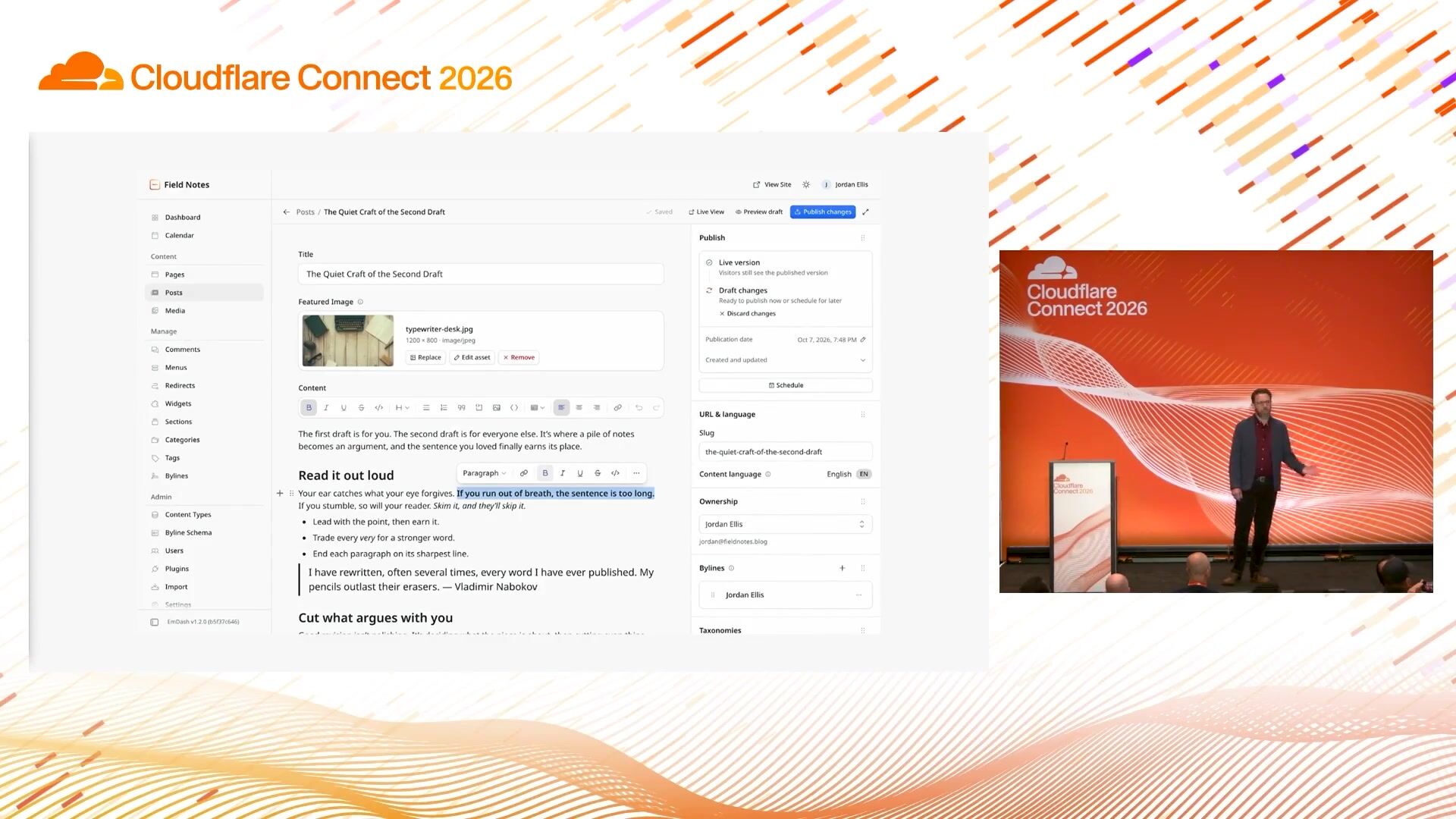
7:04and this is what the editing experience looks like you know it's it's pretty familiar this isn't going to be rocket science to anybody but I think this idea is it's just nice you know a nice editor we're making a lot of changes it's probably changed since I recorded this last week or something but we're just polishing it just getting it improved so
7:27I'm going to show a sort of way that you work with M-Dash on a day-to-day basis. So if you look really carefully, there is a typo on the title of this up there. So I'm going to show how you edit that. There's also a load of metadata that we want to change. So I'm going to show how we move those. And to do that, I'm going to go and do my demo.
8:04so here's the site with the um with our typo and while we've got a full admin interface we've also just got edit mode for the simple things so this is built in to m dash you don't need to install a separate site editor or anything any edit any content there you can just do shows unpublished changes uh and then we publish it and that's live so but all of these um entries these metadata entries up at the top are um they're going to be annoying to fill in for all of my um entries and this but luckily this is this is 2026 so i'm going to say fill in the meta for each record um use info from each entry and uh skip any that are on
8:57oh well you'll understand me um leave them as drafts so this is this is like this is running inside chat gpt here so this is the i'm this isn't a special um added in feature that i've got in there this is just rather than building in a chat bot inside the um interface we will just talk to any chatbot that you want because it's got the mcp and it just built directly into into there so i'm loading this in the browser here in the um chat gpt browser now it's using so this is the codex thing and it's basically looking at the records here um it's getting um finding the the data on inside each of the posts and then it's uh going to see if it can find the metadata from out to there and i think the key part of this is that obviously you can use an agent to write your blog posts but that's not what they're great for you know they can write a blog post but it's not going to be a great blog post the thing that i find it really exciting to use for is the really boring stuff so going through all of these things um and so if i look at the the admin page here let's expand this again and it's it's got all these pending changes i'm going to go and back and look at this and um let's there we go so it's filled in all of this all of this metadata and it's grabbed it from reading the reading all of the posts and you can do other stuff like you
10:29know tell it to fill in all the seo data and i think this is the just an example of the way that you can make it happen anything where it's got um any uh thing that human can do it's able to just go and do the same sort of thing so this is just showing and it can go and change your schema or it can you know to do any any sort of um stuff that it needs to do there so i think i'll wrap up from the demo here and just move on um okay so this is the this is the point here that these get they get the access that you need them to have so here we've said this is going to get the collection it's going to find all the content it's going to find it all from skip the ones that are unclear um and then publish the changes so but the point is this that if it's acting as me and i'm super admin do i want an agent that can go in there and suddenly delete our users and all that kind of stuff it's like well no because we can give it granular access controls and you can say this agent here this is all they can do is edit the content it can't edit any of the other stuff or you know you are doing it for something that needs more needs access um so and then this is onto plugins which are the harder part so that was fine you just give them granular access and they get what they want now plugins are more difficult because they are code so for this i took inspiration from mobile apps um where
12:00they are given the capability that they declare when you install a mobile app you say are you going to give it access to you know my my camera or going to give access to location or whatever um and so this works because it runs in a sandbox and the sandbox when you're deploying it and cloudflare workers is a dynamic worker um but you when you're running on node it has it runs worker d on its um on itself so you can self -host it as well with the full sandboxing um and instead of having direct access to anything any of the content you it gets provided with only the stuff that you've told it that it can do it's not even that you have to like trust it it gives it the exact things that they've given you access to so it gets its own um own content store it has its own um own storage um and you allow list particular domains even if you want to and that so and if they try and call fetch it just doesn't work at all so it's locked down and you don't need to you know you basically tell it what you want tell what it's allowed and that's what it can do so i think that that's quite a important change for the model there and it was something that we probably the thing that we spent the most amount of time getting right because plugins are so important with wordpress and they're so important for a cms but they're also so dangerous so it's this is why we've you know this is why we've gone for this model here that we're gonna we're gonna do this so um but
13:32does this work for you know i've been talking about this thing that i've built with loads of agents and stuff and is it real is it you know it's not i've said it's not april fall it's 1 .0 but does it actually work in production so we decided that we were going to have to put our money where our mouth is we can't ask other people to use mdash without using it ourselves so in the summer we migrated over the cloudflare blog so this was before it was 1.0 so we were taking a bit of a bit of a chance on that one um and this is the this is these are the numbers for agents week when we um in july when we when we first launched it um so we posted 28 posts over the over the course of a week loads and loads of editors working on it um and got lots of page views like there's a three around three million live page views on that plus or that doesn't include all the attacks that we had we got attacked in the middle of it and um and it was very spiky as well so when particular posts were really popular there was suddenly a ton of traffic and obviously you know that would be embarrassing being cloud flare if we can handle that so mdash managed to manage to handle that so i've just given you a pretty brief introduction but mdash is totally free open source mit so it's more flexible than wordpress you can use it for whatever you want you can run it on wordpress on cloud flare or you can run it on self-host it yourself if you want um all you need to do npm create mdash, and give it a go.
15:02Thanks a lot.
James Snell
Cloudflare
Ryan Dahl
Cloudflare
Tanner Linsley
TanStack
Be the first to know when registration opens and the agenda goes live.
---
title: "EmDash: The secure WordPress successor for humans and agents"
url: "https://www.cloudflare.com/connect/2026/session/emdash-the-secure-wordpress-successor-for-humans-and-agents"
year: 2026
---

# EmDash: The secure WordPress successor for humans and agents

[Watch session](https://www.cloudflare.com/connect/2026/session/emdash-the-secure-wordpress-successor-for-humans-and-agents)

[View slides (PDF)](https://www.cloudflare.com/connect/2026/session/emdash-the-secure-wordpress-successor-for-humans-and-agents/slides.pdf)

## Session details

- **Track:** Web Performance & Frameworks
- **Topics:** Content monetization, Agentic AI & MCP, App modernization
- **Solution areas:** Developer Platform

## About this session

WordPress powers 43% of the web but was built for another age. At Cloudflare, we asked, “What would WordPress look like if it were built for the agentic era?” In this talk, Matt Kane (creator of EmDash) introduces EmDash — a full-stack TypeScript CMS powered by Astro and Cloudflare Workers. EmDash keeps what made WordPress successful (extensibility, plugin ecosystem, familiar admin UX) but rebuilds it on secure, sandboxed foundations with agents as first-class citizens.

## Speakers

- [Matt Kane](https://www.cloudflare.com/connect/speakers/2405306) — Senior Principal Systems Engineer, Cloudflare

## Transcript

[0:03] I'm Matt. I'm a principal engineer at Cloudflare. I'm on the Astro core team and I'm going to talk about what I've been building. So I've been on the Astro core team for a few years and we've had a running joke for a long time that we need to build a CMS because it sort of, it feels like a missing part of Astro. that Astro kind of needs a CMS in there. But every time it came up in planning, people would laugh and we'd move on and we'd not do anything. I started working at Cloudflare and you just realized exactly a year ago today. And what I was surprised to find is that when I arrived here, that it was also a running joke here, that we've wanted to build a CMS for ages and it wasn't possible before.

[0:56] I got, they're seen as me in January. I wasn't in the hills there, but I get a DM from Dane, our CTO. Apparently, I find out later that he was actually with, he was with Matthew, our CEO at the same time. So this is my imaginary thing of where they are. And he said, just, can you build a new WordPress for us? And surprisingly, obviously, I'd been thinking about this quite a lot. So I- I actually immediately said yes. And then, of course, I was like, oh, my God, what am I going to do here?

[1:31] So the first big question there, though, is if you are building a new WordPress in 2026, what does it look like? Because it certainly doesn't look like what WordPress did 20 years ago because it's a different world.

[1:46] This is our answer to what we think it looks like. You know, this is just one way. This is M-dash, if anybody's not seen it before. This is a full stack CMS in TypeScript, runs on Astro, can be deployed to Cloudflow workers or Node. It's open source. And I started on this in January with me and lots of agents and a big token budget and a deadline of seeing what I could build in two months. And... we went to our first public alpha on the 1st of April and then spent the next six months trying to explain to people that this wasn't a joke. It was actually real. We've really created this thing.

[2:32] And then we went to 1.0 just a few weeks ago. So hopefully this is our answer to it being real. It is real.

[2:41] If you want to know about more details about how I built it and how we're managing it as an open source project, come and see my talk. tomorrow i'm doing a system sketch where i'm talking about the actual behind it today i'm going to talk about what it is and why it's shaped the way that it is so um it's this is surprisingly controversial but um i like wordpress um i've i've said this to lots of wordpress people and they're quite surprised um but it's obviously it's got a lot of issues but i think we've got some really important things right and there's you know it doesn't become such a popular thing and so stick around 20 years without getting some stuff pretty right and i think that there are three big things that it got right first anybody can just go in there and edit it's like you can get in there you can type it looks you know kind of vaguely like what you're getting and it comes out at the end and you don't need to talk to a dev and that is you know that is great and then but the real killer i think is that if it doesn't do something you want it to do there's tens of thousands of plugins out there that can make it do whatever you want and so that one is absolutely crucial as well and then when you finish when you publish you've got a site right there you don't need to build an extra site that talks to it or anything you've just got the whole thing there and i think that those are the three things that i think that really make wordpress amazing and that's what i want to try and try to capture in mdash but i didn't want to capture everything from wordpress so there's a lot of stuff with wordpress

[4:12] that just doesn't make sense in 2026. So in WordPress, all of everything is in the same trust boundary. So your database, all of your users, your front, all of your code, and also all of your plugins. Every plugin you run is running in the same trust zone as all of the rest of the code. So if your gallery plugin, can access your user table and it can exfiltrate all of your password hashes if it really wants to and obviously most plugins don't most plugins are legit but when you've got 60 000 plugins that's a lot of plugins that you need to trust so it's not really surprising that that's why the um that's why the uh that's why the uh most of the um issues most of the vulnerability you get in work WordPress, like 90 % plus of them are in plugins.

[5:08] The core WordPress core, generally pretty solid, doesn't get many vulnerabilities in it. And the problem is you just need one WordPress plugin to be owned or malicious, and you've lost a lot. So that was one thing we wanted to solve.

[5:28] And so what we've done with MDash is we've kept these things as separate. So we've kept the core the core things that you want to store in your cms all your content mainly in all of the configuration and everything and we've given you an edit admin interface which is the bit that i've shown before that looks familiar to any um any wordpress admin that stuff you know talks talks to it the thing that is different for 2026 is that mdash has been built with agents as first class citizens from from the start so the agent doesn't need to use the admin and it doesn't need to like have itself set up for an api and you don't need to install plugins or anything it's got built in mcp it can do anything that a human can do um and it's got like lots of affordances to make it work better in there while plugins don't get access to much at all except where it's been specifically granted so It is sandboxed.

[6:34] You tell them exactly what they have access to, and that's all they get. I'll go into that a little bit more in a moment. And then the site itself is just an Astro site. So if anybody has used Astro, they can use emdash. They can build an emdash site. Basically, it's exactly the same. The interfaces, you know, you change, if you've used the get entry, it's just changed to get emdash entries. Exactly the same. It's all type safe and works really well.

[7:04] and this is what the editing experience looks like you know it's it's pretty familiar this isn't going to be rocket science to anybody but I think this idea is it's just nice you know a nice editor we're making a lot of changes it's probably changed since I recorded this last week or something but we're just polishing it just getting it improved so

[7:27] I'm going to show a sort of way that you work with M-Dash on a day-to-day basis. So if you look really carefully, there is a typo on the title of this up there. So I'm going to show how you edit that. There's also a load of metadata that we want to change. So I'm going to show how we move those. And to do that, I'm going to go and do my demo.

[8:04] so here's the site with the um with our typo and while we've got a full admin interface we've also just got edit mode for the simple things so this is built in to m dash you don't need to install a separate site editor or anything any edit any content there you can just do shows unpublished changes uh and then we publish it and that's live so but all of these um entries these metadata entries up at the top are um they're going to be annoying to fill in for all of my um entries and this but luckily this is this is 2026 so i'm going to say fill in the meta for each record um use info from each entry and uh skip any that are on

[8:57] oh well you'll understand me um leave them as drafts so this is this is like this is running inside chat gpt here so this is the i'm this isn't a special um added in feature that i've got in there this is just rather than building in a chat bot inside the um interface we will just talk to any chatbot that you want because it's got the mcp and it just built directly into into there so i'm loading this in the browser here in the um chat gpt browser now it's using so this is the codex thing and it's basically looking at the records here um it's getting um finding the the data on inside each of the posts and then it's uh going to see if it can find the metadata from out to there and i think the key part of this is that obviously you can use an agent to write your blog posts but that's not what they're great for you know they can write a blog post but it's not going to be a great blog post the thing that i find it really exciting to use for is the really boring stuff so going through all of these things um and so if i look at the the admin page here let's expand this again and it's it's got all these pending changes i'm going to go and back and look at this and um let's there we go so it's filled in all of this all of this metadata and it's grabbed it from reading the reading all of the posts and you can do other stuff like you

[10:29] know tell it to fill in all the seo data and i think this is the just an example of the way that you can make it happen anything where it's got um any uh thing that human can do it's able to just go and do the same sort of thing so this is just showing and it can go and change your schema or it can you know to do any any sort of um stuff that it needs to do there so i think i'll wrap up from the demo here and just move on um okay so this is the this is the point here that these get they get the access that you need them to have so here we've said this is going to get the collection it's going to find all the content it's going to find it all from skip the ones that are unclear um and then publish the changes so but the point is this that if it's acting as me and i'm super admin do i want an agent that can go in there and suddenly delete our users and all that kind of stuff it's like well no because we can give it granular access controls and you can say this agent here this is all they can do is edit the content it can't edit any of the other stuff or you know you are doing it for something that needs more needs access um so and then this is onto plugins which are the harder part so that was fine you just give them granular access and they get what they want now plugins are more difficult because they are code so for this i took inspiration from mobile apps um where

[12:00] they are given the capability that they declare when you install a mobile app you say are you going to give it access to you know my my camera or going to give access to location or whatever um and so this works because it runs in a sandbox and the sandbox when you're deploying it and cloudflare workers is a dynamic worker um but you when you're running on node it has it runs worker d on its um on itself so you can self -host it as well with the full sandboxing um and instead of having direct access to anything any of the content you it gets provided with only the stuff that you've told it that it can do it's not even that you have to like trust it it gives it the exact things that they've given you access to so it gets its own um own content store it has its own um own storage um and you allow list particular domains even if you want to and that so and if they try and call fetch it just doesn't work at all so it's locked down and you don't need to you know you basically tell it what you want tell what it's allowed and that's what it can do so i think that that's quite a important change for the model there and it was something that we probably the thing that we spent the most amount of time getting right because plugins are so important with wordpress and they're so important for a cms but they're also so dangerous so it's this is why we've you know this is why we've gone for this model here that we're gonna we're gonna do this so um but

[13:32] does this work for you know i've been talking about this thing that i've built with loads of agents and stuff and is it real is it you know it's not i've said it's not april fall it's 1 .0 but does it actually work in production so we decided that we were going to have to put our money where our mouth is we can't ask other people to use mdash without using it ourselves so in the summer we migrated over the cloudflare blog so this was before it was 1.0 so we were taking a bit of a bit of a chance on that one um and this is the this is these are the numbers for agents week when we um in july when we when we first launched it um so we posted 28 posts over the over the course of a week loads and loads of editors working on it um and got lots of page views like there's a three around three million live page views on that plus or that doesn't include all the attacks that we had we got attacked in the middle of it and um and it was very spiky as well so when particular posts were really popular there was suddenly a ton of traffic and obviously you know that would be embarrassing being cloud flare if we can handle that so mdash managed to manage to handle that so i've just given you a pretty brief introduction but mdash is totally free open source mit so it's more flexible than wordpress you can use it for whatever you want you can run it on wordpress on cloud flare or you can run it on self-host it yourself if you want um all you need to do npm create mdash, and give it a go.

[15:02] Thanks a lot.

## Related sessions

- [A runtime for developers and their agents](https://www.cloudflare.com/connect/2026/session/a-runtime-for-developers-and-their-agents)
- [Self-hosting Durable Objects](https://www.cloudflare.com/connect/2026/session/self-hosting-durable-objects)
- [TanStack Start, and the rest of the TanStack ecosystem](https://www.cloudflare.com/connect/2026/session/tanstack-start-and-the-rest-of-the-tanstack-ecosystem)

## More from Connect

- [All sessions](https://www.cloudflare.com/connect/)
- [Get notified for Connect 2027](https://www.cloudflare.com/connect#2027)

