Web Performance & Frameworks
Building P1 on Cloudflare: AI-native web composition and governance

Chris Yates
Pantheon
Modern web applications ship repeated patterns across JavaScript, CSS, APIs, and page responses, but traditional compression treats many of those responses independently. This problem is more pronounced in the vibe-coding era. In this session, developers, platform teams, and performance engineers can learn to make sites faster while reducing bandwidth costs. Learn how shared compression dictionaries work, where they help most, and how you can deploy them safely through Cloudflare. You will leave with a practical model for identifying dictionary-friendly traffic, measuring performance impact, and rolling out compression improvements without changing application code.
0:02Hi, welcome. How's everybody's Kinect going? Good? Yes? Thumbs up all around? Sweet. Cool. Well, welcome to Reducing the Payloads with Shared Compression Dictionaries. My name is Alex Trivett. I work in product at Cloudflare, joined by Tim Kadlich, who also works in product at Cloudflare. And we're really excited to talk to you about how we can do this, some really new and exciting. calls that are coming into vogue right now all right um so as a good product manager we're going to start with the problem here um so uh your application on one side um maybe has 272 i forgot the number i wrote yes 272 kb uh it's massive um but the good thing about it is that everybody's already downloaded that version of it already uh some time later uh maybe something happens you have to make a one line code fix somewhere fixes a bug fixes something and uh you know you have to uh go back make that change in the javascript uh that's fine it's uh on the wire compressed in gzip 92 kilobytes down to the browser it's cached but because it's that one line change the browser sort of has this amnesia it's a bit like jason born waking up and you're like oh my gosh who am i It has to do that every single time you make that one line change, which is bad because with AI, with deployments,
1:33how many times a day are we deploying now? Many, many times a day. And if the browser wakes up as Jason Bourne each one of those times, you're sending that 92 KB down the wire a lot. You're compressing a lot. This is a problem. So we're going to talk about how we can help the browser. Remember that it already has most of that file in the browser already. And that's the big hack here. So with that, Tim is going to go into some of the basics of compression now. TIMOTHY JORDAN- Yeah. So to understand why, oh, that's loud. Is that loud? Hopefully not too loud. To understand why compression doesn't actually fix this, we do have to understand a little bit about how it works. So basically, every format of compression that we use since 1977 has been using the same optimization.
2:21Before that, it was basically just entropy encoding, the idea that like, okay, E is more common than X, the is more common than xylophone. And so we just kind of replaced those common words with other tokens and things like that to try to condense. But in 1977, L77 comes along, and the idea here is we now have a sliding window where we're able to look back at the text that we've already seen within a particular chunk of bytes, and we're able to replace that with pointers. So we can say, example, go back 46 characters and then select nine of them. And then instead of passing the full characters along, we just pass those pointers. There's still an entropy encoding phase alongside of that where we go through and we find the most common patterns of those pointers and then we replace those with tokens as well to further condense.
3:06But the idea is we've always had this sliding window again since 1977 and the way you can think about that is it's like if I were to say to Alex like do you remember that joke from this morning, Alex is probably going to say yes. If I were to say, do you remember this, you know, the joke that I told you the other week, there's way too many and everything like that. I'm way too funny of a guy. He's not going to be able to tell you which one it is. Because again, we've gone beyond that sliding window. Now the formats, the optimizations up to this point, mostly have been about how far back can it look? Like how big is that window? So gzip can remember up to 32 kilobytes, probably can go up to 16. megabytes um now in theory that's a really big window in reality it's just worth noting that like when we inflate that window we incur a lot of processing and overhead and things like that so there are trade -offs that come with it getting the hang of the clicker pressing the wrong button there we go now the problem with this is we're still isolated to the individual requests that we're looking at okay um compression has this concept of basically amnesia as soon as we go back to another response we go to another request we have to start fresh again right there's no maintained context between version one of your javascript file and version two a dictionary actually helps to fix that what a dictionary does is it brings bytes that to both sides that we've already seen and we can use that to compress so now we're not just using the sliding window context and basing it on what have we seen within this individual response but we can actually get pretty precise with this
4:40So Bratly ships a generic dictionary for everyone, again an improvement of it in and of itself. Bratly between this and the context window will actually be much more efficient in terms of compression in most cases than gzip. Z standard lets you bring your own dictionary and this is where the magic actually happens. Because the best dictionary is the file the browser has already seen. When we use that previous build, we can say okay, Bratly. you've seen this server you've seen this we've both seen v1 v2 comes along we change one line of code but because we've seen everything else we can use that as a dictionary and suddenly everything that we pass through any unchanged code just becomes little pointers and the only thing that actually has to be passed over the network is the Delta so when we do this in a lab environment and we test this we saw a 272 kilobyte JavaScript bundle gets reduced to 92 kilobytes with gzip and then once we've got this shared dictionary of the prior version of the library that we passed along, it goes all the way down to 2.6 kilobytes, so a 97% reduction over gzip alone because we're able to use that custom dictionary.
5:51Now, the way this works in the browser is a combination of basically we have three headers and two encodings. So again, there's some communication that has to happen. I've been trying to talk Alex into getting matching decoder rings because I'd like to be able to communicate them in a way where the rest of the team doesn't know what we're talking about. We're getting, it's on the shopping list, I believe. Yes. But you can think about it this way, right? Like we have to be using the same one or else this is not going to work. And so what happens is the first time the server is actually going to send back and say, hey, use this dictionary. And then it provides a pattern that you can match this against. And what it's telling the browser is you can take this resource that I've sent you. I'm going to let you use it as a dictionary for further requests. And it's going to to match against anything that matches that pattern so in this case javascript slash app and then the asterisk is our wildcard .js so now let's say that we do a new deploy we get a new version a new version of the javascript comes on we've made that one line change or whatever it is the browser says okay cool i've got to make a request for this resource actually i have a dictionary that i've stored as a sha 256 hash i have a dictionary for this thing it matches this pattern and So it comes back and it says to the server, hey, I'm requesting this resource.
7:04I need the new JavaScript. But it passes along that SHA-256 hash and says, I have a dictionary available. Then the server can, and it also says the DCB and DCZ is basically just saying, I know how to speak this. I know how to decode that. And then the server comes back and it says, well, cool, you have the dictionary. It's a valid dictionary. You know how to decode this. It's going to be safe to do this. And so it can just pass back that small, hyper-truncated. version and the browser is going to be able to figure it out from there it also passes back a vari header that tells every cache along the way that you know this is dependent on that dictionary so it's a very simple mechanism really it's just like again let them know that this is the dictionary browser says cool i've got it and i can speak the language server says cool we can talk now now the big difference here is this is not the first time we've tried to do something like this and i see a few head nods uh did try some concept of shared dictionaries before.
7:57SDCH, which I believe is pronounced sandwich, which is fun, I guess, from a food perspective. But it was one browser that did this. There was no standard around it. There was no good answer to a lot of the actual issues that we had, particularly from a security perspective. Things like compression attacks. So it didn't get much traction, despite being around for like, what, nine years or so. The difference here is that this is RFC 98. 842. This is a standard. It is built around the browser security model. That means it's same origin only. It's HTTPS only. It's hash checked. It's cleared with your cookies. There's a lot more built into the browser to make sure that this is safe to do and efficient to do. As a result, we see about 72 % of global browser usage already supports it. Chrome, Edge, other Chromium browsers basically since Chrome 130.
8:48Firefox has it available. nightly, Safari is working on it. So we would expect, you know, that browser usage is going to go up pretty soon. We also see that one in every 10 Chrome page loads on the web have a dictionary already available. Now, this is kind of inflated. You know, you've got that head of the web versus the tail of the web, and the head is comprised of a lot of very popular sites. And so a lot of those popular sites are the ones using it. But again, this is not like something that doesn't exist. This is something that seeing out being used by some of these larger sites on the web google search is one of them so google search has actually experimented with this for their search result pages and what they've seen is when they have this dictionary available it's a 23 smaller html payload that they're able to pass over the network and then has a trickle-down effect so largest contentful paint one of the most important user-facing performance metrics that we have on the web if you're not familiar it's a metric that tells us when is largest piece of content on a page, when does that get displayed?
9:49So that could be your image, your text, whatever it is. When they ran this same experiment, again, they saw that 23 % improvement over Brotley alone, but there was a trickle -down effect where LCP improved by 1 .7 % and up to 9 % on high latency networks, which again, makes a lot of sense, right? If we're suddenly passing back 2 .6 kilobytes instead of 92, we can fit more on a single round trip. We're probably having to incur a lot less of that latency overhead. and again you would expect that the impact here would be even more beneficial depending on you know how much that initial bundle size was compared to if we can get it down to one single round trip because it's small enough to fit in that size so it's very impactful um and it's exciting honestly that this is here and that this is being actually supported and worked on um but if it's so great and it's so beneficial and it's so impactful and all it is is a couple the question becomes why are we not seeing this more widespread why are we not doing this at the cdn level alex why is this hard hard for a number of reasons good fantastic transition um okay so it's hard why is it hard for cdn i don't really want to like bring this down into like a woe is us because we are actively working on remediating these things which we're going to like get to later but these are some of the like foot guns and things that we've seen and run into we're actively developing this like first thing is that uh it's quite expensive for cash uh you
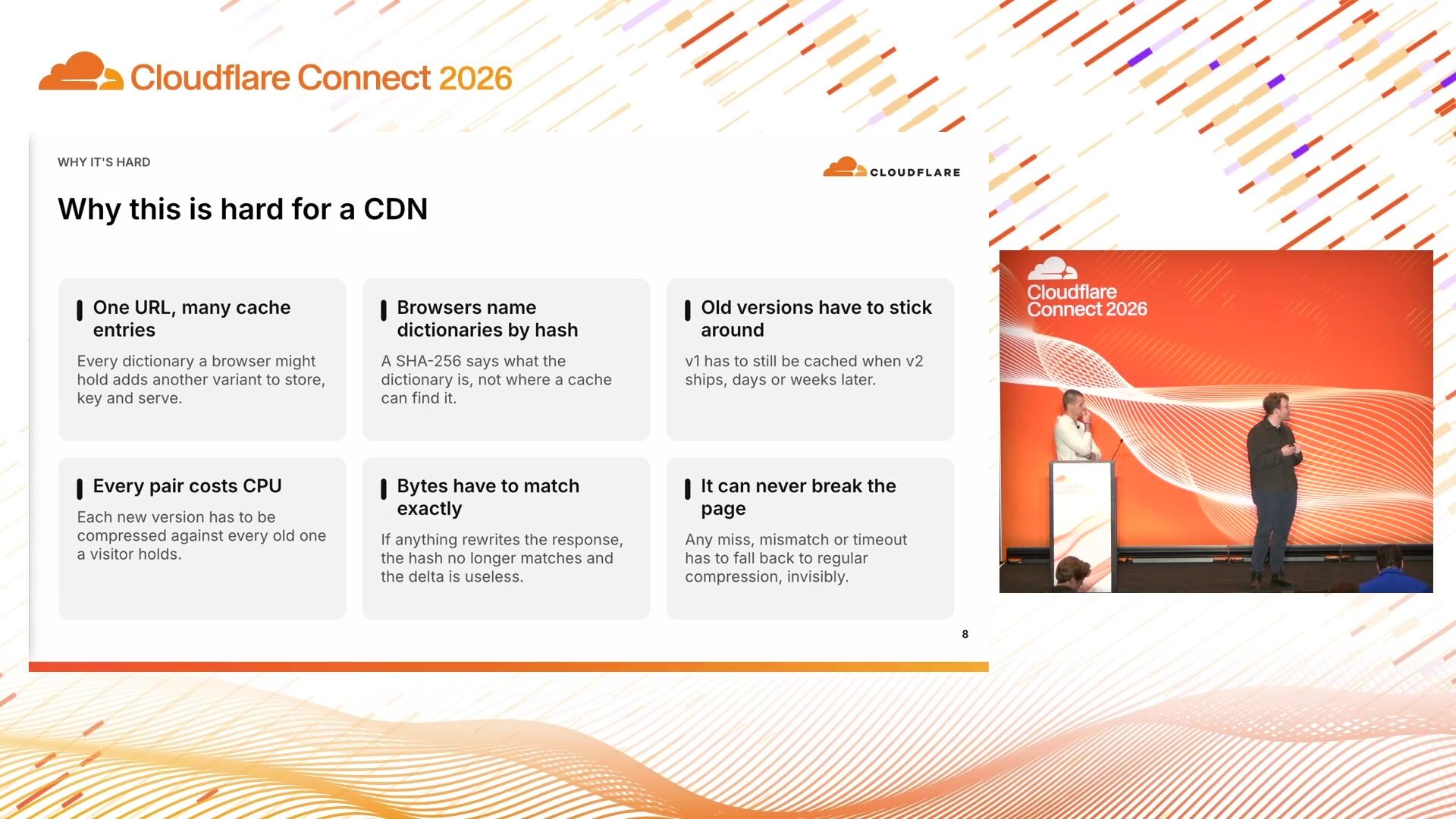
11:20have to not only store their variants of a particular of the same asset but you also have to store versions of that asset so that you have something to uh do the delta compression against so you have multiple dimensions that you need to store in cash just in case um you know you need it you need to pull that uh diff down um there's a second sort of naming piece that's a little bit difficult. As Tim was saying, browsers oftentimes say and describe the dictionaries that they have by a hash, whereas if you're talking to cache, realizing that those words are quite similar when I'm saying them out loud, that those, we oftentimes use URIs, URLs to find those things. They're parts of cache keys. So that can be quite hard where you're trying to translate various hashes into cache keys.
12:07How do those things operate? Like very hard problem for resource. location and understanding like there is a browser there is there is a dictionary available um sort of what i was saying as a piece of the the first thing where your cache explodes is that you need to keep a lot of your old entries if um a browser comes back maybe after a month or two months and they're saying hey i have uh version six of this um and we're on version 10 of this and we're trying to pull a delta compression against that we need to make sure that those things are compatible that we can catch those up That may also mean, again, that we have to store that version longer. So we have something to delta off of to catch them up to that latest version. But is sort of the porollary to CDN problems. Everything, obviously, is costing so much CPU these days.
12:53If we're doing this delta compression, four people building these dictionaries, four people, it takes CPU on every single side of that. Last two for time I'll sort of mash together insofar as that. The bytes have to mash. exactly and you know breaking that page try to send them something that they're unable to decode is quite difficult because you're breaking things from a CDN perspective that can be a silent break or it's a break that needs to have like a rum beacon fire to tell us that something is is is broken so lots of things to consider to make one of those things a little bit more clear and transparent is that yes one URL can have many answers dependent on on, you know, who is coming and asking for that and where we need to catch them up in terms of both what the encoding is and which version that they can go to in this situation, this version nine app that everybody is getting can have many, many different answers that you might not expect.
13:49So I think there's 12 or 16 that I put in there, but is yeah, you can see how there's that major cash explosion. And again, the problem at the bottom is that if you're serving the wrong variant that the browser cannot decode, you're breaking pages, that is not great. So are we going to do this at Cloudflare? The first version that we shipped back in April, I believe, end of April, we call pass-through mode. And pass-through mode is essentially saying, OK, Cloudflare is going to allow this to happen, but insofar as it happens on your origin. must do the delta we we can cache things at the edge send us a uh you know available dictionary uh and you know if we get some dcz back from your origin those things can get cached and be returned as hits uh in very particular circumstances but a lot of the work in terms of actually building those dictionaries and sending them through uh needs to happen uh at your origin you have to bring your own dictionaries um don't touch anything.
14:59We're just caching things, sort of a dumb pipe in this situation. And we're going to cache every single variant. So we have that explosion problem that we've been talking about, which is why this is hard. If we sort of look forward and making some forward-looking statements now, a thing that we are currently building here is called manage mode, which is how do we take that load off of your origin and do it for you? So this may. it such that a lot of things that you would maybe uh do at your origin sort of come into a cloud flare uh we're solving a lot of the cache key and mesh problems by appending some responses with an id um so that we can look up those hashes and cache keys and find where in the cache they are build those deltas off of them uh to send back to the browsers uh when they're available uh that helps uh the problem of you know pointing where in the We need to look for that dictionary conversion so that we can build that delta.
15:59And yeah, we build the delta once, which is fantastic. We don't have to store these widespread amount of variants.
16:07And so the ID is sort of the big innovation, I think, that we're looking towards here because it helps us find it in cache. You know, the delta once problem is, you know, incredible because that explosion isn't there. We verify everything. Everything is in cache before we go to your origin, which should reduce load and CPU on customer origin side, which is fantastic. And if there is no match, if we can't delta, if we can't find things, we're going to fail open. We're going to push back down to classical or I think what I call normal compression in this situation. And you can sort of look to see a very demo -y version of the delta compression today and this manage mode. on canicompress.com.
16:52It should sort of walk you through the process, how all of this works, if you're trying to get a better feel of it. And yeah, lots of JavaScript bytes that you can see deployed and reduced, which is fantastic. And you can do it today on any Chromium or Edge-based browser. So things you can do when you get back to your laptop. Turn on pass-through. if you want to play with it obviously you know your origin needs to support it um if you want to wait for the managed mode that should be shipping soon i was told i cannot give dates so that is going to be soon um you know make sure you're marking your dictionaries obviously make sure that you understand the rfc your origin is cooperating our cache is cooperating test things very important um and then yes manage mode on the way um we i think these slides will be available we tried to help with some uh links at the bottom that will be beneficial for you as you're investigating and looking into this um if i'm seeing people take pictures i'm gonna you know stall for a little while um but thank you guys so much for coming to our talk i know it's late in the day on the second day so really cool to see everybody here and thank you
Chris Yates
Pantheon
Steve Goldsmith, Mattie Toia
Cloudflare · Uber
Alex Krivit, Syed Suleman Ahmad
Cloudflare
Be the first to know when registration opens and the agenda goes live.
---
title: "Reducing payloads with shared compression dictionaries"
url: "https://www.cloudflare.com/connect/2026/session/reducing-payloads-with-shared-compression-dictionaries"
year: 2026
---

# Reducing payloads with shared compression dictionaries

[Watch session](https://www.cloudflare.com/connect/2026/session/reducing-payloads-with-shared-compression-dictionaries)

## Session details

- **Track:** Web Performance & Frameworks
- **Topics:** AI inference & workloads, Cloudflare product innovations
- **Solution areas:** Application Performance

## About this session

Modern web applications ship repeated patterns across JavaScript, CSS, APIs, and page responses, but traditional compression treats many of those responses independently. This problem is more pronounced in the vibe-coding era. In this session, developers, platform teams, and performance engineers can learn to make sites faster while reducing bandwidth costs. Learn how shared compression dictionaries work, where they help most, and how you can deploy them safely through Cloudflare. You will leave with a practical model for identifying dictionary-friendly traffic, measuring performance impact, and rolling out compression improvements without changing application code.

## Speakers

- [Alex Krivit](https://www.cloudflare.com/connect/speakers/2421418) — PM, Cloudflare
- [Tim Kadlec](https://www.cloudflare.com/connect/speakers/2615759) — Principal Product Manager, Cloudflare

## Transcript

[0:02] Hi, welcome. How's everybody's Kinect going? Good? Yes? Thumbs up all around? Sweet. Cool. Well, welcome to Reducing the Payloads with Shared Compression Dictionaries. My name is Alex Trivett. I work in product at Cloudflare, joined by Tim Kadlich, who also works in product at Cloudflare. And we're really excited to talk to you about how we can do this, some really new and exciting. calls that are coming into vogue right now all right um so as a good product manager we're going to start with the problem here um so uh your application on one side um maybe has 272 i forgot the number i wrote yes 272 kb uh it's massive um but the good thing about it is that everybody's already downloaded that version of it already uh some time later uh maybe something happens you have to make a one line code fix somewhere fixes a bug fixes something and uh you know you have to uh go back make that change in the javascript uh that's fine it's uh on the wire compressed in gzip 92 kilobytes down to the browser it's cached but because it's that one line change the browser sort of has this amnesia it's a bit like jason born waking up and you're like oh my gosh who am i It has to do that every single time you make that one line change, which is bad because with AI, with deployments,

[1:33] how many times a day are we deploying now? Many, many times a day. And if the browser wakes up as Jason Bourne each one of those times, you're sending that 92 KB down the wire a lot. You're compressing a lot. This is a problem. So we're going to talk about how we can help the browser. Remember that it already has most of that file in the browser already. And that's the big hack here. So with that, Tim is going to go into some of the basics of compression now. TIMOTHY JORDAN- Yeah. So to understand why, oh, that's loud. Is that loud? Hopefully not too loud. To understand why compression doesn't actually fix this, we do have to understand a little bit about how it works. So basically, every format of compression that we use since 1977 has been using the same optimization.

[2:21] Before that, it was basically just entropy encoding, the idea that like, okay, E is more common than X, the is more common than xylophone. And so we just kind of replaced those common words with other tokens and things like that to try to condense. But in 1977, L77 comes along, and the idea here is we now have a sliding window where we're able to look back at the text that we've already seen within a particular chunk of bytes, and we're able to replace that with pointers. So we can say, example, go back 46 characters and then select nine of them. And then instead of passing the full characters along, we just pass those pointers. There's still an entropy encoding phase alongside of that where we go through and we find the most common patterns of those pointers and then we replace those with tokens as well to further condense.

[3:06] But the idea is we've always had this sliding window again since 1977 and the way you can think about that is it's like if I were to say to Alex like do you remember that joke from this morning, Alex is probably going to say yes. If I were to say, do you remember this, you know, the joke that I told you the other week, there's way too many and everything like that. I'm way too funny of a guy. He's not going to be able to tell you which one it is. Because again, we've gone beyond that sliding window. Now the formats, the optimizations up to this point, mostly have been about how far back can it look? Like how big is that window? So gzip can remember up to 32 kilobytes, probably can go up to 16. megabytes um now in theory that's a really big window in reality it's just worth noting that like when we inflate that window we incur a lot of processing and overhead and things like that so there are trade -offs that come with it getting the hang of the clicker pressing the wrong button there we go now the problem with this is we're still isolated to the individual requests that we're looking at okay um compression has this concept of basically amnesia as soon as we go back to another response we go to another request we have to start fresh again right there's no maintained context between version one of your javascript file and version two a dictionary actually helps to fix that what a dictionary does is it brings bytes that to both sides that we've already seen and we can use that to compress so now we're not just using the sliding window context and basing it on what have we seen within this individual response but we can actually get pretty precise with this

[4:40] So Bratly ships a generic dictionary for everyone, again an improvement of it in and of itself. Bratly between this and the context window will actually be much more efficient in terms of compression in most cases than gzip. Z standard lets you bring your own dictionary and this is where the magic actually happens. Because the best dictionary is the file the browser has already seen. When we use that previous build, we can say okay, Bratly. you've seen this server you've seen this we've both seen v1 v2 comes along we change one line of code but because we've seen everything else we can use that as a dictionary and suddenly everything that we pass through any unchanged code just becomes little pointers and the only thing that actually has to be passed over the network is the Delta so when we do this in a lab environment and we test this we saw a 272 kilobyte JavaScript bundle gets reduced to 92 kilobytes with gzip and then once we've got this shared dictionary of the prior version of the library that we passed along, it goes all the way down to 2.6 kilobytes, so a 97% reduction over gzip alone because we're able to use that custom dictionary.

[5:51] Now, the way this works in the browser is a combination of basically we have three headers and two encodings. So again, there's some communication that has to happen. I've been trying to talk Alex into getting matching decoder rings because I'd like to be able to communicate them in a way where the rest of the team doesn't know what we're talking about. We're getting, it's on the shopping list, I believe. Yes. But you can think about it this way, right? Like we have to be using the same one or else this is not going to work. And so what happens is the first time the server is actually going to send back and say, hey, use this dictionary. And then it provides a pattern that you can match this against. And what it's telling the browser is you can take this resource that I've sent you. I'm going to let you use it as a dictionary for further requests. And it's going to to match against anything that matches that pattern so in this case javascript slash app and then the asterisk is our wildcard .js so now let's say that we do a new deploy we get a new version a new version of the javascript comes on we've made that one line change or whatever it is the browser says okay cool i've got to make a request for this resource actually i have a dictionary that i've stored as a sha 256 hash i have a dictionary for this thing it matches this pattern and So it comes back and it says to the server, hey, I'm requesting this resource.

[7:04] I need the new JavaScript. But it passes along that SHA-256 hash and says, I have a dictionary available. Then the server can, and it also says the DCB and DCZ is basically just saying, I know how to speak this. I know how to decode that. And then the server comes back and it says, well, cool, you have the dictionary. It's a valid dictionary. You know how to decode this. It's going to be safe to do this. And so it can just pass back that small, hyper-truncated. version and the browser is going to be able to figure it out from there it also passes back a vari header that tells every cache along the way that you know this is dependent on that dictionary so it's a very simple mechanism really it's just like again let them know that this is the dictionary browser says cool i've got it and i can speak the language server says cool we can talk now now the big difference here is this is not the first time we've tried to do something like this and i see a few head nods uh did try some concept of shared dictionaries before.

[7:57] SDCH, which I believe is pronounced sandwich, which is fun, I guess, from a food perspective. But it was one browser that did this. There was no standard around it. There was no good answer to a lot of the actual issues that we had, particularly from a security perspective. Things like compression attacks. So it didn't get much traction, despite being around for like, what, nine years or so. The difference here is that this is RFC 98. 842. This is a standard. It is built around the browser security model. That means it's same origin only. It's HTTPS only. It's hash checked. It's cleared with your cookies. There's a lot more built into the browser to make sure that this is safe to do and efficient to do. As a result, we see about 72 % of global browser usage already supports it. Chrome, Edge, other Chromium browsers basically since Chrome 130.

[8:48] Firefox has it available. nightly, Safari is working on it. So we would expect, you know, that browser usage is going to go up pretty soon. We also see that one in every 10 Chrome page loads on the web have a dictionary already available. Now, this is kind of inflated. You know, you've got that head of the web versus the tail of the web, and the head is comprised of a lot of very popular sites. And so a lot of those popular sites are the ones using it. But again, this is not like something that doesn't exist. This is something that seeing out being used by some of these larger sites on the web google search is one of them so google search has actually experimented with this for their search result pages and what they've seen is when they have this dictionary available it's a 23 smaller html payload that they're able to pass over the network and then has a trickle-down effect so largest contentful paint one of the most important user-facing performance metrics that we have on the web if you're not familiar it's a metric that tells us when is largest piece of content on a page, when does that get displayed?

[9:49] So that could be your image, your text, whatever it is. When they ran this same experiment, again, they saw that 23 % improvement over Brotley alone, but there was a trickle -down effect where LCP improved by 1 .7 % and up to 9 % on high latency networks, which again, makes a lot of sense, right? If we're suddenly passing back 2 .6 kilobytes instead of 92, we can fit more on a single round trip. We're probably having to incur a lot less of that latency overhead. and again you would expect that the impact here would be even more beneficial depending on you know how much that initial bundle size was compared to if we can get it down to one single round trip because it's small enough to fit in that size so it's very impactful um and it's exciting honestly that this is here and that this is being actually supported and worked on um but if it's so great and it's so beneficial and it's so impactful and all it is is a couple the question becomes why are we not seeing this more widespread why are we not doing this at the cdn level alex why is this hard hard for a number of reasons good fantastic transition um okay so it's hard why is it hard for cdn i don't really want to like bring this down into like a woe is us because we are actively working on remediating these things which we're going to like get to later but these are some of the like foot guns and things that we've seen and run into we're actively developing this like first thing is that uh it's quite expensive for cash uh you

[11:20] have to not only store their variants of a particular of the same asset but you also have to store versions of that asset so that you have something to uh do the delta compression against so you have multiple dimensions that you need to store in cash just in case um you know you need it you need to pull that uh diff down um there's a second sort of naming piece that's a little bit difficult. As Tim was saying, browsers oftentimes say and describe the dictionaries that they have by a hash, whereas if you're talking to cache, realizing that those words are quite similar when I'm saying them out loud, that those, we oftentimes use URIs, URLs to find those things. They're parts of cache keys. So that can be quite hard where you're trying to translate various hashes into cache keys.

[12:07] How do those things operate? Like very hard problem for resource. location and understanding like there is a browser there is there is a dictionary available um sort of what i was saying as a piece of the the first thing where your cache explodes is that you need to keep a lot of your old entries if um a browser comes back maybe after a month or two months and they're saying hey i have uh version six of this um and we're on version 10 of this and we're trying to pull a delta compression against that we need to make sure that those things are compatible that we can catch those up That may also mean, again, that we have to store that version longer. So we have something to delta off of to catch them up to that latest version. But is sort of the porollary to CDN problems. Everything, obviously, is costing so much CPU these days.

[12:53] If we're doing this delta compression, four people building these dictionaries, four people, it takes CPU on every single side of that. Last two for time I'll sort of mash together insofar as that. The bytes have to mash. exactly and you know breaking that page try to send them something that they're unable to decode is quite difficult because you're breaking things from a CDN perspective that can be a silent break or it's a break that needs to have like a rum beacon fire to tell us that something is is is broken so lots of things to consider to make one of those things a little bit more clear and transparent is that yes one URL can have many answers dependent on on, you know, who is coming and asking for that and where we need to catch them up in terms of both what the encoding is and which version that they can go to in this situation, this version nine app that everybody is getting can have many, many different answers that you might not expect.

[13:49] So I think there's 12 or 16 that I put in there, but is yeah, you can see how there's that major cash explosion. And again, the problem at the bottom is that if you're serving the wrong variant that the browser cannot decode, you're breaking pages, that is not great. So are we going to do this at Cloudflare? The first version that we shipped back in April, I believe, end of April, we call pass-through mode. And pass-through mode is essentially saying, OK, Cloudflare is going to allow this to happen, but insofar as it happens on your origin. must do the delta we we can cache things at the edge send us a uh you know available dictionary uh and you know if we get some dcz back from your origin those things can get cached and be returned as hits uh in very particular circumstances but a lot of the work in terms of actually building those dictionaries and sending them through uh needs to happen uh at your origin you have to bring your own dictionaries um don't touch anything.

[14:59] We're just caching things, sort of a dumb pipe in this situation. And we're going to cache every single variant. So we have that explosion problem that we've been talking about, which is why this is hard. If we sort of look forward and making some forward-looking statements now, a thing that we are currently building here is called manage mode, which is how do we take that load off of your origin and do it for you? So this may. it such that a lot of things that you would maybe uh do at your origin sort of come into a cloud flare uh we're solving a lot of the cache key and mesh problems by appending some responses with an id um so that we can look up those hashes and cache keys and find where in the cache they are build those deltas off of them uh to send back to the browsers uh when they're available uh that helps uh the problem of you know pointing where in the We need to look for that dictionary conversion so that we can build that delta.

[15:59] And yeah, we build the delta once, which is fantastic. We don't have to store these widespread amount of variants.

[16:07] And so the ID is sort of the big innovation, I think, that we're looking towards here because it helps us find it in cache. You know, the delta once problem is, you know, incredible because that explosion isn't there. We verify everything. Everything is in cache before we go to your origin, which should reduce load and CPU on customer origin side, which is fantastic. And if there is no match, if we can't delta, if we can't find things, we're going to fail open. We're going to push back down to classical or I think what I call normal compression in this situation. And you can sort of look to see a very demo -y version of the delta compression today and this manage mode. on canicompress.com.

[16:52] It should sort of walk you through the process, how all of this works, if you're trying to get a better feel of it. And yeah, lots of JavaScript bytes that you can see deployed and reduced, which is fantastic. And you can do it today on any Chromium or Edge-based browser. So things you can do when you get back to your laptop. Turn on pass-through. if you want to play with it obviously you know your origin needs to support it um if you want to wait for the managed mode that should be shipping soon i was told i cannot give dates so that is going to be soon um you know make sure you're marking your dictionaries obviously make sure that you understand the rfc your origin is cooperating our cache is cooperating test things very important um and then yes manage mode on the way um we i think these slides will be available we tried to help with some uh links at the bottom that will be beneficial for you as you're investigating and looking into this um if i'm seeing people take pictures i'm gonna you know stall for a little while um but thank you guys so much for coming to our talk i know it's late in the day on the second day so really cool to see everybody here and thank you

## Related sessions

- [Building P1 on Cloudflare: AI-native web composition and governance](https://www.cloudflare.com/connect/2026/session/building-p1-on-cloudflare-ai-native-web-composition-and-governance)
- [Co-engineering the future: How Uber & Cloudflare engineer a global platform](https://www.cloudflare.com/connect/2026/session/co-engineering-the-future-how-uber-and-cloudflare-engineer-a-global-platform)
- [Securing Internet traffic for the quantum computing era](https://www.cloudflare.com/connect/2026/session/securing-internet-traffic-for-the-quantum-computing-era)

## More from Connect

- [All sessions](https://www.cloudflare.com/connect/)
- [Get notified for Connect 2027](https://www.cloudflare.com/connect#2027)


