Secure AI
Prevent, don’t detect: Introducing Cloud Workload Security

Neil Brown
Cloudflare
Cloud Workload Security is a new and unique approach to securing cloud resources. While most tools focus on catching risks after the fact, CWS uses an inline proxy to inspect cloud API calls as they happen. It enforces policy as code in real time, blocking insecure or unapproved actions before the cloud provider ever executes them, both at creation and during runtime. The CWS policy engine lets teams enforce controls that weren’t practically possible before. In this session, we walk through two examples: preventing data exfiltration to untrusted external accounts in AWS, and then securing the configuration and runtime of AI services like Amazon Bedrock. Leave understanding how to prevent cloud risks with CWS.
0:02I appreciate everyone coming out to the session today. This is a mild follow-on from an introductory session we gave yesterday, which introduced Cloud Workload Security, which is a new product that we're launching within Cloudflare. So we'll give you a really brief overview of what the product is and what we've just launched, and we'll also spend most of today's session running you through a few demos around how we can prevent misconfigurations to cloud APIs, how we can prevent... data leakage through common sort of exfiltration paths as well. So my name's Neil. I'm a Cloudflow 1 go-to-market specialist. And this is Vernon, who's a principal systems engineer. We both were the co-founders of a product called Kivara, which was acquired by Cloudflow recently. And what you're seeing today is the first integrated version of that product, which will soon be expanding out of beta.
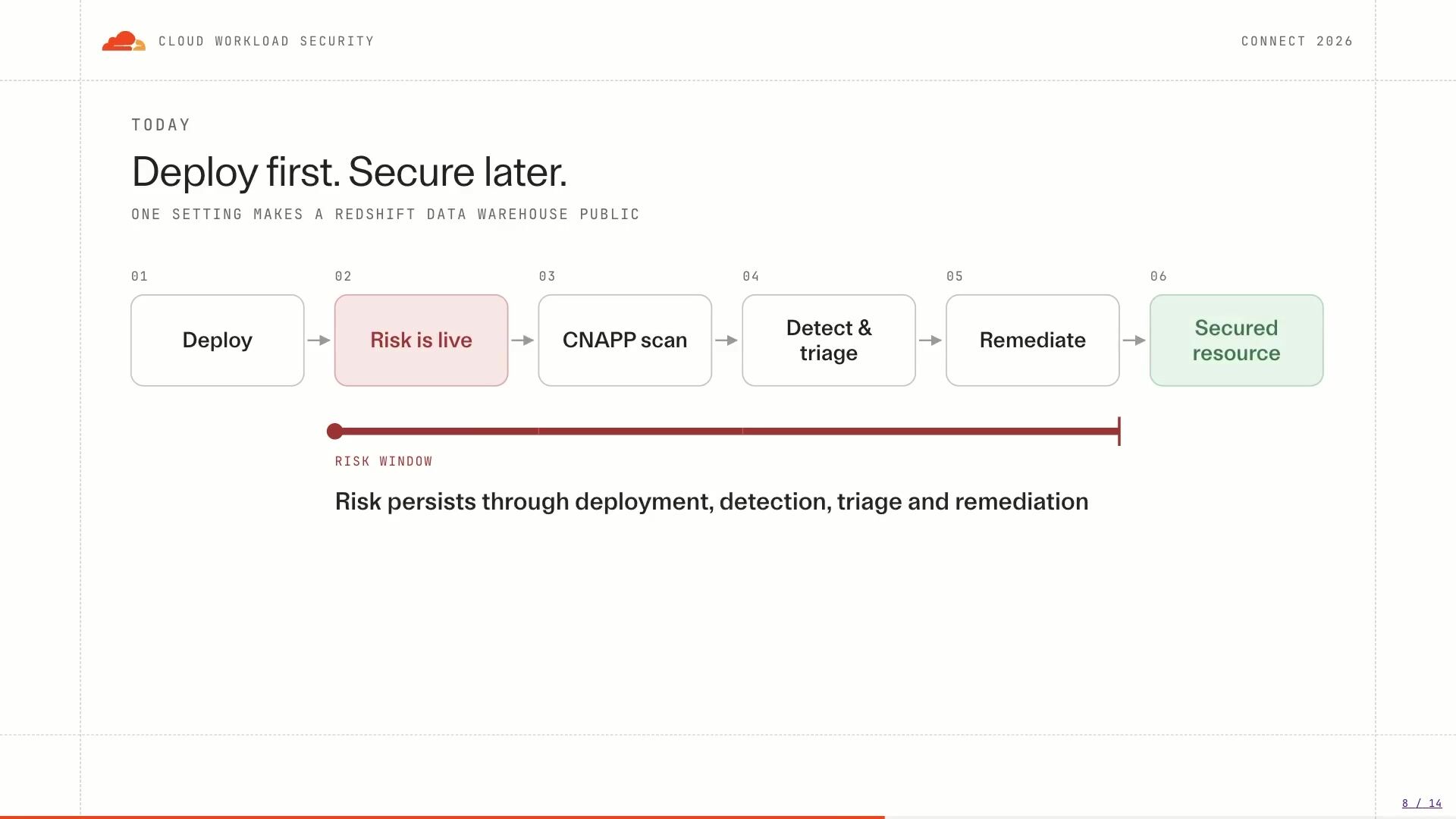
0:52So just really sort of briefly to level set. we need to understand about how we interact with the cloud provider is everything is basically an API call. So whether you're using your Terraform, Pulumi, whether you're orchestrating SDKs or CLIs, at the end of the day, an API call is being executed and sent to the cloud provider's API. So on the left -hand side, there's a request mode where you're actually configuring and saying what you need from the cloud provider. There's an execution step that happens, and then there's a deployment step when that change actually goes live into the environment. So a quick compare and contrast here, on the right -hand side is where detection happens. So if you're using a CNAP tool today, the Wizards, the Orcas, the Prisma Clouds of the world, a lot of that detection is happening on the right-hand side once the resource is already live and once the risk already exists in your environment.
1:42What we set out to solve as part of Kibera and our cloud workload security was bringing that enforcement and control point earlier into the lifecycle prior to the execution So what Cloud Workload Security is, is it's trying to bring prevention in line and making sure that your detections are acting as a second line of defense with preventions happening earlier. So Cloud Workload Security is an inline inspection proxy that sits in between your developers and the cloud provider's APIs. Now, the way we do this and to achieve the flexible architecture that you need in these circumstances is we actually allow the proxy deployed into your environments so it sits close to the developers it sits close to your cloud provider um sort of uh the initiation of those uh api calls and it doesn't matter whether you're using you know any ci cd tool your terraform cli the sdks or even workloads making calls to other workloads in the cloud provider all of these requests get proxied through this uh inline inspection uh proxy and it's applying policy in flight so it inspects the request evaluates against policy and he's allowed blocks or logs the results that come out of that.
2:48Now, I do have AWS on the right -hand side here. We'll be doing some examples on AWS today, but this CWS as a product also supports all of Cloudflare's APIs. So as you're building on our dev platform or configuring your zero trust or application security suite, you can also use CWS to control those requests. We also have Google and Azure coming as fast followers, but today we'll be focusing on AWS. So a key point is that we just provide feedback with every blocked request. So policies at the API point are not on any particular deployment tool. Now I'll quickly try and articulate this risk and then we'll have Vernon run through in a demo on what we're actually, so we can see it live. But really there's a particular risk that we come across in AWS quite frequently, which is if you have access within your corporate environment to read data, you may likely have access to exfiltrate that data using personal credentials.
3:43So let's have a quick look at this. So in this example, we have a corporate environment with an S3 bucket attached to it. Whether you are a malicious insider or someone who's gained access to the environment and is trying to move laterally through and look for potential exfiltration vectors, or you're just an employee who's made a mistake, you can read this corporate data from the S3 bucket. You can copy it locally and read it to your own device or workload. And here is where things go a little bit off the rails if we're thinking about exfiltration. At this point, in this corporate environment, we have an egress filter and what that egress filter does it could be a next-gen firewall it could be a proxy on the outbound that's looking at the different domains we're going to allow out to the internet one of those domains is start on amazon .aws .com because that allows us to interact with all of the cloud services so here is where the risk really presents itself which is when we actually bring personal credentials into the environment so my own access key for my own AWS account and I use that to put the object from my corporate environment into external bucket or an untrusted bucket.
4:40Now the challenge here is that at a network level we can't see the tenancy information contained within those credentials so we actually don't know what destination account it's going to. We also won't be able to use any of our SCPs or resource policies to control this because as we're on the device or workload we are no longer beholden to any of those controls that are in that are applied to your AWS environment so you really have network level controls left. And unfortunately, in this circumstance, they weren't strong enough to protect. So we'll show you how CWS can actually prevent this type of misconfiguration. And I think it's best we just run straight into a demo now, or our first demo, which will be demonstrating how we can potentially exfiltrate using personal credentials.
5:25So I'll hand over to Vernon to run through this next. Cool. Hey, everyone. Like I said, I'm Vernon. I'm a principal engineer working on CWS. And I'll take you through some demos today. Hopefully the demo gods are on my side. All right, so let's go through this first example. And in my organization, say I'm a developer and I've been tasked to get access to a box and I've put a prompt into my favorite AI tool and it's given me back a configuration to try. So let's go ahead and try this out. So I'm just gonna uncomment this. and basically I'm allowing ingress rings from the internet through SSH onto my instance and let's just see what happens.
6:13So I pasted that in there
6:19and basically what's going to happen now in this workflow, my CI CD tool, in this case I'm using Billkite and it's going to pick up the job and it's going to start running. So you can see here it's picked it up it's going to a Terraform plan and then do a Terraform apply. So while that's running, I'll take you through the UI and what does CWS look like in the Cloudflare dash. So the first thing is we've got a deployment. So this is your proxy deployment and your configuration. So in here you'll have the proxy, you have some policy sets, which is just a group of policies, and you have a domain ACL, so which URLs you want to allow through it. Basic auth credence. tools, deployment settings, and so forth. And the main one here is, which is quite interesting, is the workload.
7:06So how do we identify traffic coming through the proxy? So for example, in the first one, I've got non-production accounts. So I can actually define the traffic that's coming through as AWS, but I can even go further into it and create filters, which say that all the OUs, all the non -production accounts in my... production OU will be classified in this workload. So as requests come through the proxy we might have a policy set that is for NIST controls and here I've got my workloads defined. So in this one for example it's going to pick up all my non-production accounts plus the billcard agent that's running as well and then all the policies that I want to apply.
7:54So enforcing the data perimeter and In particular, the one that we were just trying, which is the EC2 security group. So what I should see when I flick back to BuildKite once it's done is basically a policy that's been applied, which says that I can't allow ingress from the internet. I need to use a private range. So if I switch back, I can see that the bill's failed. If I click into it, you can see here that it tried to create this security group rule. with 0004.0, it failed. So CWS got in the way. It said the request has been blocked. It tells you the provider, the service, and the action. But you want to know also in context of the build what actually went wrong.
8:40So if you scroll down a bit further, we've got a tool here, the CWS CLI, that will actually tell you why it failed. So developers, as they see this block, they actually know how to go and fix it. So in here, we can see that the data... policy was allowed so it's a credential that I'm allowed to use and I'm talking from an account in my organization but when I tried to create the security group rule it failed because of it's it's open to the internet so if I go back to my rule change this to private range commit that
9:23What we should see now is the build pipeline will run again, and hopefully it'll go through. So that's an example using a CI City workflow, but not all organisations might have this for all their environments. This is maybe a production workflow, and a lot of developers are using tooling from their laptops as well. So how does this work when we're doing it? actually use it from our terminal, for example. So let me just switch this back. So let's just do an example of creating that security group rule again, but from my laptop, okay, so from a terminal. So if I run this, again, it's blocked.
10:10It's the same one rule that's going to apply it no matter what you use. So in this case, this is using AWS CLI. If I was using the Python S. SDK, or whatever it might be, it would block it in the same way, because we're blocking at the API level. If I go and change that back to the private range, then ... Oh, it doesn't already exist, but if I did it to ...
10:451, 9, 2, 1, 6, 8, for example.
10:51It's blocked as well.
11:05Are you doing CIDOMath on the fly? Trying to, yeah. Yeah, so that goes through. So, let's try a different example where we've got an S3 bucket. So, here... Just before you go into this one, so we actually did the second demo first, which was just showing a misconfiguration, which is not an issue, but so, using a public range for opening on port 22 SSH, this example that I was just touching on before around the... allowed and untrusted accounts, that's the demo that Vern is just about to show you. So the exfiltration one is now, and we just showed you a misconfiguration demo. Sorry, we're just going backwards there.
11:52So also in this environment, we've got an example of trying to copy some important data to a S3 bucket. So if I try to change the bucket name to just something else, So, bad bucket.
12:19You can see that it fails. I have a policy set up in my environment that says that I can only talk to, firstly, buckets that I'm using a credential that's in my organisation, but then also a white list of buckets that I'm allowed to talk to as well. So in this case, I haven't put the right bucket in.
12:39And if I do put the right bucket in, so in this case, it's Acme Call Prod Artifacts and I try to copy it in there, then this will work. But another example of that and what Neil touched on, it was personal credentials as well. So in this environment, I've got my personal profile loaded up as well. I have my own personal account that belongs to me. If I try to copy that as well, also fails. So in the policy, we're actually looking at credentials that are originating from an account that we own, but also whitelisting the bucket as well. So it's just a pure, like in the rego policy that you write, you can have a whitelist there that says, you know, all the trusted resources that you're allowed to talk to.
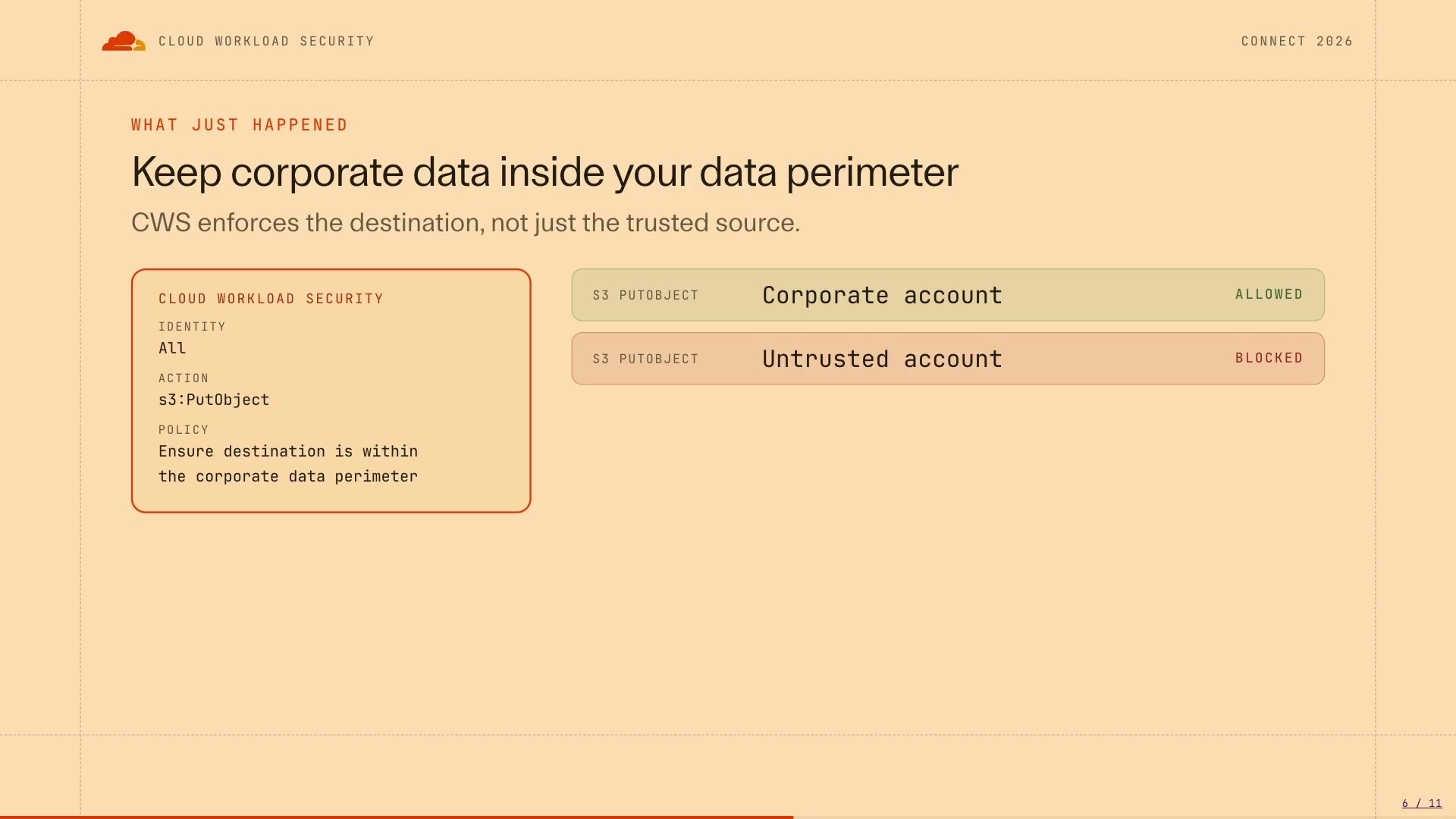
13:32So we ran through a few things there. One was putting an object to a corporate account, which was allowed, putting an object to an untrusted account, which was blocked. On the left-hand side is a little bit of a simplification of what the policies look like. We basically have identities, which is what Werner touched on earlier with deployments. You can effectively scope any API request to an identity or a deployment. And what that's doing is it's saying, based on who you are, you get a specific set of controls applied to you. So if you're in a B2B part of the business, that has a lot of interactions with external trusted providers, you can have a different allow list of buckets that they're allowed to access or a different allow list of AWS accounts they're allowed to access. You can kind of slice your traffic as you need it, depending on what it is. The other thing you'll see here is we have something called an action, and here it's S3 put object.
14:19We've effectively mapped every single AWS service and API that exists in the SDKs, and we support those as policies. So as soon as a new AWS service gets released, reinvented. coming up in another month or so we're about to see you know a deluge of different releases all of those are supported out of the box immediately because as soon as it's in the sdk we then support it um in in the proxy as well so the proxy has an up -to -date map of what each of those actions are and in the next uh i'll just quickly run through this and i'll show you one more example uh in the slide where which is here uh is just an illustration of what vernon was showing you through the demo where you have say terraform and the boto 3 uh which is what the CLI uses in Amazon, they look different at source and in code. So if you're trying to apply policy and infrastructure as code, shift left policy, you'll have to write two different rules depending on what you're actually accessing on Terraform or through the CLI.
15:14With CWS, because it's the same API call, we're applying that same policy once. And the real challenge here is that IAM and SCPs and RCPs are all great sort of tools to apply preventive... boundaries but things like i'm really controlling who who can access something and what they can actually change but they can't go one level deeper to the parameters of that particular call and say hey this port um source or protocol is the thing that we allow or want to control and that's where cws comes in it goes one level deeper on the uh ec uh the ec2 security group example that we just gave on the left hand side i'll just draw your attention to the action and the policy in something like this we could almost expand this as well we could say that for modify applications of the security group as well that we want to apply a preventive policy to those through the same single policy so you can't create a security group with an any any and you can also not modify an existing security group and add that rule in as well and that can all be part of one same policy similarly the policy language is so extensible we could also go instead of just ipv4 we could also add ipv6 in there so one policy can take care of creates updates and ipv4 and c
16:24so with the last sort of three and a half minutes I'm happy to take any questions that may have arisen during the demo or the slides anything that sort of comes to mind happy to answer any questions otherwise we are now available in open beta we have very generous free tier limits so please go ahead give it a crack download it you can run it locally on your own device or you can run it in cloud as well and it's free and open and ready to be used thank you everyone for your time if you would like to contact us directly i'm nbrown at cloudflare.com i'm happy to take any questions and continue the conversation afterwards thank you thank you
Neil Brown
Cloudflare
Christopher O'Rourke, Craig Strubhart
Cloudflare
Henry Montagu
Cloudflare
Be the first to know when registration opens and the agenda goes live.
---
title: "Prevent cloud misconfigurations and data leakage before they happen"
url: "https://www.cloudflare.com/connect/2026/session/prevent-cloud-misconfigurations-and-data-leakage-before-they-happen"
year: 2026
---

# Prevent cloud misconfigurations and data leakage before they happen

[Watch session](https://www.cloudflare.com/connect/2026/session/prevent-cloud-misconfigurations-and-data-leakage-before-they-happen)

[View slides (PDF)](https://www.cloudflare.com/connect/2026/session/prevent-cloud-misconfigurations-and-data-leakage-before-they-happen/slides.pdf)

## Session details

- **Track:** Security & Compliance
- **Topics:** Security modernization & zero trust, Network modernization & multicloud, Data security & privacy
- **Solution areas:** SASE & Workspace Security (Cloudflare One)

## About this session

Cloud Workload Security is a new and unique approach to securing cloud resources. While most tools focus on catching risks after the fact, CWS uses an inline proxy to inspect cloud API calls as they happen. It enforces policy as code in real time, blocking insecure or unapproved actions before the cloud provider ever executes them, both at creation and during runtime. The CWS policy engine lets teams enforce controls that weren’t practically possible before. In this session, we walk through two examples: preventing data exfiltration to untrusted external accounts in AWS, and then securing the configuration and runtime of AI services like Amazon Bedrock. Leave understanding how to prevent cloud risks with CWS.

## Speakers

- [Neil Brown](https://www.cloudflare.com/connect/speakers/2496966) — Senior Cloudflare One GTM Specialist, Cloudflare
- [Vernon Jefferson](https://www.cloudflare.com/connect/speakers/2503405) — Principal Systems Engineer, Cloudflare

## Transcript

[0:02] I appreciate everyone coming out to the session today. This is a mild follow-on from an introductory session we gave yesterday, which introduced Cloud Workload Security, which is a new product that we're launching within Cloudflare. So we'll give you a really brief overview of what the product is and what we've just launched, and we'll also spend most of today's session running you through a few demos around how we can prevent misconfigurations to cloud APIs, how we can prevent... data leakage through common sort of exfiltration paths as well. So my name's Neil. I'm a Cloudflow 1 go-to-market specialist. And this is Vernon, who's a principal systems engineer. We both were the co-founders of a product called Kivara, which was acquired by Cloudflow recently. And what you're seeing today is the first integrated version of that product, which will soon be expanding out of beta.

[0:52] So just really sort of briefly to level set. we need to understand about how we interact with the cloud provider is everything is basically an API call. So whether you're using your Terraform, Pulumi, whether you're orchestrating SDKs or CLIs, at the end of the day, an API call is being executed and sent to the cloud provider's API. So on the left -hand side, there's a request mode where you're actually configuring and saying what you need from the cloud provider. There's an execution step that happens, and then there's a deployment step when that change actually goes live into the environment. So a quick compare and contrast here, on the right -hand side is where detection happens. So if you're using a CNAP tool today, the Wizards, the Orcas, the Prisma Clouds of the world, a lot of that detection is happening on the right-hand side once the resource is already live and once the risk already exists in your environment.

[1:42] What we set out to solve as part of Kibera and our cloud workload security was bringing that enforcement and control point earlier into the lifecycle prior to the execution So what Cloud Workload Security is, is it's trying to bring prevention in line and making sure that your detections are acting as a second line of defense with preventions happening earlier. So Cloud Workload Security is an inline inspection proxy that sits in between your developers and the cloud provider's APIs. Now, the way we do this and to achieve the flexible architecture that you need in these circumstances is we actually allow the proxy deployed into your environments so it sits close to the developers it sits close to your cloud provider um sort of uh the initiation of those uh api calls and it doesn't matter whether you're using you know any ci cd tool your terraform cli the sdks or even workloads making calls to other workloads in the cloud provider all of these requests get proxied through this uh inline inspection uh proxy and it's applying policy in flight so it inspects the request evaluates against policy and he's allowed blocks or logs the results that come out of that.

[2:48] Now, I do have AWS on the right -hand side here. We'll be doing some examples on AWS today, but this CWS as a product also supports all of Cloudflare's APIs. So as you're building on our dev platform or configuring your zero trust or application security suite, you can also use CWS to control those requests. We also have Google and Azure coming as fast followers, but today we'll be focusing on AWS. So a key point is that we just provide feedback with every blocked request. So policies at the API point are not on any particular deployment tool. Now I'll quickly try and articulate this risk and then we'll have Vernon run through in a demo on what we're actually, so we can see it live. But really there's a particular risk that we come across in AWS quite frequently, which is if you have access within your corporate environment to read data, you may likely have access to exfiltrate that data using personal credentials.

[3:43] So let's have a quick look at this. So in this example, we have a corporate environment with an S3 bucket attached to it. Whether you are a malicious insider or someone who's gained access to the environment and is trying to move laterally through and look for potential exfiltration vectors, or you're just an employee who's made a mistake, you can read this corporate data from the S3 bucket. You can copy it locally and read it to your own device or workload. And here is where things go a little bit off the rails if we're thinking about exfiltration. At this point, in this corporate environment, we have an egress filter and what that egress filter does it could be a next-gen firewall it could be a proxy on the outbound that's looking at the different domains we're going to allow out to the internet one of those domains is start on amazon .aws .com because that allows us to interact with all of the cloud services so here is where the risk really presents itself which is when we actually bring personal credentials into the environment so my own access key for my own AWS account and I use that to put the object from my corporate environment into external bucket or an untrusted bucket.

[4:40] Now the challenge here is that at a network level we can't see the tenancy information contained within those credentials so we actually don't know what destination account it's going to. We also won't be able to use any of our SCPs or resource policies to control this because as we're on the device or workload we are no longer beholden to any of those controls that are in that are applied to your AWS environment so you really have network level controls left. And unfortunately, in this circumstance, they weren't strong enough to protect. So we'll show you how CWS can actually prevent this type of misconfiguration. And I think it's best we just run straight into a demo now, or our first demo, which will be demonstrating how we can potentially exfiltrate using personal credentials.

[5:25] So I'll hand over to Vernon to run through this next. Cool. Hey, everyone. Like I said, I'm Vernon. I'm a principal engineer working on CWS. And I'll take you through some demos today. Hopefully the demo gods are on my side. All right, so let's go through this first example. And in my organization, say I'm a developer and I've been tasked to get access to a box and I've put a prompt into my favorite AI tool and it's given me back a configuration to try. So let's go ahead and try this out. So I'm just gonna uncomment this. and basically I'm allowing ingress rings from the internet through SSH onto my instance and let's just see what happens.

[6:13] So I pasted that in there

[6:19] and basically what's going to happen now in this workflow, my CI CD tool, in this case I'm using Billkite and it's going to pick up the job and it's going to start running. So you can see here it's picked it up it's going to a Terraform plan and then do a Terraform apply. So while that's running, I'll take you through the UI and what does CWS look like in the Cloudflare dash. So the first thing is we've got a deployment. So this is your proxy deployment and your configuration. So in here you'll have the proxy, you have some policy sets, which is just a group of policies, and you have a domain ACL, so which URLs you want to allow through it. Basic auth credence. tools, deployment settings, and so forth. And the main one here is, which is quite interesting, is the workload.

[7:06] So how do we identify traffic coming through the proxy? So for example, in the first one, I've got non-production accounts. So I can actually define the traffic that's coming through as AWS, but I can even go further into it and create filters, which say that all the OUs, all the non -production accounts in my... production OU will be classified in this workload. So as requests come through the proxy we might have a policy set that is for NIST controls and here I've got my workloads defined. So in this one for example it's going to pick up all my non-production accounts plus the billcard agent that's running as well and then all the policies that I want to apply.

[7:54] So enforcing the data perimeter and In particular, the one that we were just trying, which is the EC2 security group. So what I should see when I flick back to BuildKite once it's done is basically a policy that's been applied, which says that I can't allow ingress from the internet. I need to use a private range. So if I switch back, I can see that the bill's failed. If I click into it, you can see here that it tried to create this security group rule. with 0004.0, it failed. So CWS got in the way. It said the request has been blocked. It tells you the provider, the service, and the action. But you want to know also in context of the build what actually went wrong.

[8:40] So if you scroll down a bit further, we've got a tool here, the CWS CLI, that will actually tell you why it failed. So developers, as they see this block, they actually know how to go and fix it. So in here, we can see that the data... policy was allowed so it's a credential that I'm allowed to use and I'm talking from an account in my organization but when I tried to create the security group rule it failed because of it's it's open to the internet so if I go back to my rule change this to private range commit that

[9:23] What we should see now is the build pipeline will run again, and hopefully it'll go through. So that's an example using a CI City workflow, but not all organisations might have this for all their environments. This is maybe a production workflow, and a lot of developers are using tooling from their laptops as well. So how does this work when we're doing it? actually use it from our terminal, for example. So let me just switch this back. So let's just do an example of creating that security group rule again, but from my laptop, okay, so from a terminal. So if I run this, again, it's blocked.

[10:10] It's the same one rule that's going to apply it no matter what you use. So in this case, this is using AWS CLI. If I was using the Python S. SDK, or whatever it might be, it would block it in the same way, because we're blocking at the API level. If I go and change that back to the private range, then ... Oh, it doesn't already exist, but if I did it to ...

[10:45] 1, 9, 2, 1, 6, 8, for example.

[10:51] It's blocked as well.

[11:05] Are you doing CIDOMath on the fly? Trying to, yeah. Yeah, so that goes through. So, let's try a different example where we've got an S3 bucket. So, here... Just before you go into this one, so we actually did the second demo first, which was just showing a misconfiguration, which is not an issue, but so, using a public range for opening on port 22 SSH, this example that I was just touching on before around the... allowed and untrusted accounts, that's the demo that Vern is just about to show you. So the exfiltration one is now, and we just showed you a misconfiguration demo. Sorry, we're just going backwards there.

[11:52] So also in this environment, we've got an example of trying to copy some important data to a S3 bucket. So if I try to change the bucket name to just something else, So, bad bucket.

[12:19] You can see that it fails. I have a policy set up in my environment that says that I can only talk to, firstly, buckets that I'm using a credential that's in my organisation, but then also a white list of buckets that I'm allowed to talk to as well. So in this case, I haven't put the right bucket in.

[12:39] And if I do put the right bucket in, so in this case, it's Acme Call Prod Artifacts and I try to copy it in there, then this will work. But another example of that and what Neil touched on, it was personal credentials as well. So in this environment, I've got my personal profile loaded up as well. I have my own personal account that belongs to me. If I try to copy that as well, also fails. So in the policy, we're actually looking at credentials that are originating from an account that we own, but also whitelisting the bucket as well. So it's just a pure, like in the rego policy that you write, you can have a whitelist there that says, you know, all the trusted resources that you're allowed to talk to.

[13:32] So we ran through a few things there. One was putting an object to a corporate account, which was allowed, putting an object to an untrusted account, which was blocked. On the left-hand side is a little bit of a simplification of what the policies look like. We basically have identities, which is what Werner touched on earlier with deployments. You can effectively scope any API request to an identity or a deployment. And what that's doing is it's saying, based on who you are, you get a specific set of controls applied to you. So if you're in a B2B part of the business, that has a lot of interactions with external trusted providers, you can have a different allow list of buckets that they're allowed to access or a different allow list of AWS accounts they're allowed to access. You can kind of slice your traffic as you need it, depending on what it is. The other thing you'll see here is we have something called an action, and here it's S3 put object.

[14:19] We've effectively mapped every single AWS service and API that exists in the SDKs, and we support those as policies. So as soon as a new AWS service gets released, reinvented. coming up in another month or so we're about to see you know a deluge of different releases all of those are supported out of the box immediately because as soon as it's in the sdk we then support it um in in the proxy as well so the proxy has an up -to -date map of what each of those actions are and in the next uh i'll just quickly run through this and i'll show you one more example uh in the slide where which is here uh is just an illustration of what vernon was showing you through the demo where you have say terraform and the boto 3 uh which is what the CLI uses in Amazon, they look different at source and in code. So if you're trying to apply policy and infrastructure as code, shift left policy, you'll have to write two different rules depending on what you're actually accessing on Terraform or through the CLI.

[15:14] With CWS, because it's the same API call, we're applying that same policy once. And the real challenge here is that IAM and SCPs and RCPs are all great sort of tools to apply preventive... boundaries but things like i'm really controlling who who can access something and what they can actually change but they can't go one level deeper to the parameters of that particular call and say hey this port um source or protocol is the thing that we allow or want to control and that's where cws comes in it goes one level deeper on the uh ec uh the ec2 security group example that we just gave on the left hand side i'll just draw your attention to the action and the policy in something like this we could almost expand this as well we could say that for modify applications of the security group as well that we want to apply a preventive policy to those through the same single policy so you can't create a security group with an any any and you can also not modify an existing security group and add that rule in as well and that can all be part of one same policy similarly the policy language is so extensible we could also go instead of just ipv4 we could also add ipv6 in there so one policy can take care of creates updates and ipv4 and c

[16:24] so with the last sort of three and a half minutes I'm happy to take any questions that may have arisen during the demo or the slides anything that sort of comes to mind happy to answer any questions otherwise we are now available in open beta we have very generous free tier limits so please go ahead give it a crack download it you can run it locally on your own device or you can run it in cloud as well and it's free and open and ready to be used thank you everyone for your time if you would like to contact us directly i'm nbrown at cloudflare.com i'm happy to take any questions and continue the conversation afterwards thank you thank you

## Related sessions

- [Prevent, don’t detect: Introducing Cloud Workload Security](https://www.cloudflare.com/connect/2026/session/prevent-dont-detect-introducing-cloud-workload-security)
- [Rethinking insider risk for a workforce of people and agents](https://www.cloudflare.com/connect/2026/session/rethinking-insider-risk-for-a-workforce-of-people-and-agents)
- [Building Argus: AI & ML threat detection at scale in Cloudflare](https://www.cloudflare.com/connect/2026/session/building-argus-ai-and-ml-threat-detection-at-scale-in-cloudflare)

## More from Connect

- [All sessions](https://www.cloudflare.com/connect/)
- [Get notified for Connect 2027](https://www.cloudflare.com/connect#2027)


