Security & Compliance
Prevent cloud misconfigurations and data leakage before they happen


Neil Brown, Vernon Jefferson
Cloudflare
Today, cloud security mostly works by detection. Something gets misconfigured, a tool flags it, and someone chases it down. By then, the risky configuration is already live and on the path to exploitation. Cloud Workload Security (CWS) is a new addition to the Cloudflare One platform. It’s a modern inline proxy for the cloud that stops insecure configurations and unapproved actions before they are executed by the cloud provider, across build, deploy, and runtime. In this session, we launch CWS, walk through the use cases driving early adoption, and show where it fits alongside your existing cloud security stack.
0:03secure your cloud environments excellent so moving forward uh we'll probably see a pretty common example of what happens in a in a security operations day -to -day we have alerts coming through maybe there's something that we found in our cloud environment where an rds database has been publicly accessible maybe someone a developer has deployed an ec2 instance and is attached in any any security group to it. Or maybe our SageMaker notebook has been made public to the internet. For each of the alerts that come through, we have to ask ourselves a series of questions. Is it a true positive or is it a false positive? Is it, what is the data classification for this particular resource? Is it particularly sensitive or is it just public information that we don't really care about? Is the exposure live in the environment or has it already been fixed and remediated? Who owns it?
0:51Who can fix it? And worst of all, has it already been compromised? So detect is already putting us on the back foot and putting us a step behind where we need to be, which is solving the risks up front. So what we found is that up to 60 % of organizations are taking longer than four days to resolve their security issues. And you can imagine how quickly attackers are moving these days, particularly with AI-assisted attack vectors. Four days is simply too long to be resolving security incidents and risks that we're finding in these environments. Now, cloud risk is not only just living in a bubble. it multiplies by the different ways that we interact with cloud environments. So every team that deploys to cloud introduces its own risk. Every account that we deploy to, every cloud service that we want to use, every deployment path we take.
1:36So whether you're using Terraform today, whether you're using Pulumi tomorrow, you're orchestrating cloud SDKs, using the CLI or the console, each of these deployment paths has different risks and vectors that we need to consider and control for. And today, more than ever, every AI-assisted change is also a concern environments. Whether we're using agents to generate new code that we're deploying to cloud environments, or we're using AI -assisted changes through MCPs, each sort of deployment mode gives us another vector to think about, and it's increasing the velocity and scale. So regardless of how we're orchestrating, deploying to cloud, or using our cloud environments, there's more paths to deploy, there's more ways to deploy, and it's getting faster than teams can remediate these days. So what I want to leave you with today is that the best alert is the one you'll never receive. So we'll come back to how we achieve this, but I really want this to stick with you, which is that we don't need to be chasing down alerts.
2:29We can block these issues up front with cloud workload security. So cloud workload security is an inline inspection proxy. And in a pretty new sort of approach with Cloudflare, we're actually allowing you to deploy this service as close to your cloud resources as possible by allowing it to be deployed within your. cloud environments. So the entire proxy and proxy suite will sit as close to your resources as possible within your cloud environments. And what we're doing is we're inspecting cloud API calls as they pass through the proxy and applying policy in flight. So we can prevent misconfigurations before they're deployed and become risks in your real environment. So how does this really work? What we have on the left hand side here is a set of different ways that you can call and orchestrate the cloud APIs, whether you're using a central CICD pipeline or a set of CICD pipelines.
3:16maybe using Terraform to deploy your resources, the CLI, SDK, or workloads talking to other cloud APIs, all of these different deployment paths or API calls will run through the CWS proxy. What CWS proxy is doing is in a very sort of fast way. It's been built for serious enterprise scale. And in a few milliseconds, we're inspecting that request. We're evaluating against a set of policies that you create. And we're really... resulting the eventual request in an allow, a block, or a log. What we'll do once the result is either an allow or a log event is we'll allow it onto the APIs without it being modified. So if you have a compliant deployment that meets all of your policies, what we'll have is it'll get evaluated through the proxy in a few milliseconds or tens of milliseconds and pass on to the cloud provider APIs unaffected.
4:08Now, the really key thing here is that we don't only just support the AWS APIs and we will be... focusing on aws today as we touch on a few different misconfigurations that are common we also support all of cloudflare's apis so if you have ways in which you're orchestrating our developer platform our ai services our zero trust platform or even our application security portfolio you can do that and control those through cws as well we support both cloudflare apis and aws apis we will focus on aws misconfigurations today though because they're a little bit more fun um so if we do have a block event what's happening is the proxy is gonna to rather than passing on that request to the cloud provider it's going to block it up front and give feedback to that developer immediately so they're going to be able to fix that in code and rectify the issue before moving forward so policy is not applied to the deployment tool it's not an IAC scanning type tool we're not doing code specific controls we're doing it at the API level which gives us a universal way to apply policy to every request coming through actually gives us a lot more power than going into the source code or doing detection later on in the environment.
5:08So let's look at a typical misconfiguration that gets deployed to AWS, but with something like a CNAP tool in place. Now CNAP, if you're not familiar with the acronym, is a set of tools which is meant to secure and used to secure our cloud environments, but through API scanning and through detective methods. So you may have heard of Prisma Cloud from Palo Alto or Wiz as two popular CNAP products, and this is a typical workflow in the way they operate in detecting misconfiguration. So a developer is going to deploy a Redshift cluster in this example, but accidentally set the one single parameter, which is publicly accessible, to true. When they deploy that, the risk is immediately deployed and live as soon as it hits the cloud provider APIs, and then our risk window has started. Next, our CNAP or CSPM is going to scan that particular resource and identify the risk has been deployed.
6:01After that, we get an alert, it's being detected, and we have to go. through the triage process. So who owns that resource? All those questions we had earlier on in the slides, we need to go and find out what is particularly wrong with this resource, who can fix it, and how can we go and remediate that particular risk as soon as possible. Now you'll notice that the risk we know stays live until the remediation happens. Until we redeploy the resource or we fix in place, that risk is exposed and potentially causing our organization an unacceptable risk of critical exposure to the internet. in this circumstance. So the secured resource only exists after we've gone through that remediation process. Now, let's look at the same flow with CWS in place. It's the same developer, same deployment tool, the same APIs, but a different control point.
6:47So in this example, we have the proxy sitting in between the developer and the cloud provider APIs. What it's doing is it's inspecting the call as it comes through. It's identified that public access is enabled when it should be disabled. So we've blocked it immediately and provided feedback. to the developer now no risky resource was ever created in this example no request went to the cloud provider apis no public access on that redshift data warehouse has been made live so we've mitigated risk up front which is much better and we've reduced toil on our detections now the other benefit of doing this approach is that we are giving immediate feedback to the developer so they're updating the deployment config in code through their iac so the next deployment is not going to deploy the same misconfiguration again So we've fixed our code, we deploy again, and then it's allowed through with no further blocking from the CWS proxy as that secure control point, and all the resources deployed are secured by default out of the box.
7:43So to get started, it's an extremely powerful product with a very extensible policy language. It can do a lot of things, but keeping it simple, let's think about where the low-hanging fruit is with turning detections into preventions. So 80% of the alerts that are triggered are... come from around 5 % of the security rules. And this is some research done by Unit 42, which is part of Palo Alto. And thinking about that, what we can do is look at those recurring findings and start turning them into preventive policies. So if you're finding that your developers are constantly deploying NENEs and, you know, opening up SSH ports to the internet, where they're not encrypting things correctly, where they're not tagging things correctly, all those basic common controls as a source of most of our alerts, we can make those preventive controls. and start reducing the amount of toil detection and risk going into our environments.
8:29So we'll stop those bad actions up front, we'll give the developers the immediate feedback, and we'll start reducing that 80% of alerts that are coming from that small set of security rules. So every prevention is an alert you never have to chase. Let's look at another example. So we've talked about misconfigurations, but as I touched on, the proxy is a lot more powerful with its policy language than just misconfigurations. So this is a common attack vector, which is not as well known compared to some of the other breaches that have happened in AWS. But if we look at something like a corporate S3 bucket that's living within your corporate environment, we have a malicious insider or just a normal user who's got access to read that sensitive data from that corporate S3 bucket. So they've brought that data through a read call down to their device or another workload.
9:18Now, what they can do as part of that is now introduce our... personal credentials into the workflow. Everyone has an AWS account or a Cloudflow account or a Google or an Azure account. They bring those personal credentials into the environment and actually use that to put the object into their own personal bucket or personal resource. So in a normal corporate environment, you're going to have firewalls and network filters and proxies. They're going to look at this request and say, hey, we can see a put object to s3 .region .amazonaws .com or any AWS resource for that example. for that matter. What we're not seeing, though, is which account that actual put object is going to or which resource that particular put object is going through. So through CWS, we're able to see which resources are being used as part of an API call and which accounts are associated with those resources as well.
10:09So we can actually create an allow list or effectively a data perimeter around your resources to ensure that your . data only stays within your corporate environment so as we look at it here with cws in place instead of allowing that call to go out through our egress filter and that put object going through an external bucket or an untrusted bucket we're actually going to approve check the destination and make sure that it's approved and it's on our allow list before allowing it out so only allowed resources within our corporate perimeter are able to be utilized and have data flow through to them and anytime we introduce personal credentials or external account into the mix we're able to block it through the proxy given that it's in the the egress path and is able to inspect those api calls so we're going a level deeper into what you can control with um our uh cws proxy now we've launched uh cws in beta um and just a couple a day ago it's uh it's been released so you're able to go to developers .cloudflare and look at cloud workload security you can deploy it yourself it's in open beta at the moment and it's So we have some very generous limits on how to use it.
11:16And what we've seen customers do with this is deploy it within their environments, put it onto the end of their deployment tools, analyze what traffic is coming through in a monitoring or a log mode just to get a sense of what is actually going through their environment. And then start looking at some of those critical misconfigurations to prevent.
Neil Brown, Vernon Jefferson
Cloudflare
Simon Thorpe
Cloudflare
Miguel Nunes
Cloudflare
Be the first to know when registration opens and the agenda goes live.
---
title: "Prevent, don’t detect: Introducing Cloud Workload Security"
url: "https://www.cloudflare.com/connect/2026/session/prevent-dont-detect-introducing-cloud-workload-security"
year: 2026
---

# Prevent, don’t detect: Introducing Cloud Workload Security

[Watch session](https://www.cloudflare.com/connect/2026/session/prevent-dont-detect-introducing-cloud-workload-security)

[View slides (PDF)](https://www.cloudflare.com/connect/2026/session/prevent-dont-detect-introducing-cloud-workload-security/slides.pdf)

## Session details

- **Track:** Secure AI
- **Topics:** Data security & privacy, Security modernization & zero trust, Network modernization & multicloud
- **Solution areas:** SASE & Workspace Security (Cloudflare One)

## About this session

Today, cloud security mostly works by detection. Something gets misconfigured, a tool flags it, and someone chases it down. By then, the risky configuration is already live and on the path to exploitation. Cloud Workload Security (CWS) is a new addition to the Cloudflare One platform. It’s a modern inline proxy for the cloud that stops insecure configurations and unapproved actions before they are executed by the cloud provider, across build, deploy, and runtime. In this session, we launch CWS, walk through the use cases driving early adoption, and show where it fits alongside your existing cloud security stack.

## Speakers

- [Neil Brown](https://www.cloudflare.com/connect/speakers/2496966) — Senior Cloudflare One GTM Specialist, Cloudflare

## Transcript

[0:03] secure your cloud environments excellent so moving forward uh we'll probably see a pretty common example of what happens in a in a security operations day -to -day we have alerts coming through maybe there's something that we found in our cloud environment where an rds database has been publicly accessible maybe someone a developer has deployed an ec2 instance and is attached in any any security group to it. Or maybe our SageMaker notebook has been made public to the internet. For each of the alerts that come through, we have to ask ourselves a series of questions. Is it a true positive or is it a false positive? Is it, what is the data classification for this particular resource? Is it particularly sensitive or is it just public information that we don't really care about? Is the exposure live in the environment or has it already been fixed and remediated? Who owns it?

[0:51] Who can fix it? And worst of all, has it already been compromised? So detect is already putting us on the back foot and putting us a step behind where we need to be, which is solving the risks up front. So what we found is that up to 60 % of organizations are taking longer than four days to resolve their security issues. And you can imagine how quickly attackers are moving these days, particularly with AI-assisted attack vectors. Four days is simply too long to be resolving security incidents and risks that we're finding in these environments. Now, cloud risk is not only just living in a bubble. it multiplies by the different ways that we interact with cloud environments. So every team that deploys to cloud introduces its own risk. Every account that we deploy to, every cloud service that we want to use, every deployment path we take.

[1:36] So whether you're using Terraform today, whether you're using Pulumi tomorrow, you're orchestrating cloud SDKs, using the CLI or the console, each of these deployment paths has different risks and vectors that we need to consider and control for. And today, more than ever, every AI-assisted change is also a concern environments. Whether we're using agents to generate new code that we're deploying to cloud environments, or we're using AI -assisted changes through MCPs, each sort of deployment mode gives us another vector to think about, and it's increasing the velocity and scale. So regardless of how we're orchestrating, deploying to cloud, or using our cloud environments, there's more paths to deploy, there's more ways to deploy, and it's getting faster than teams can remediate these days. So what I want to leave you with today is that the best alert is the one you'll never receive. So we'll come back to how we achieve this, but I really want this to stick with you, which is that we don't need to be chasing down alerts.

[2:29] We can block these issues up front with cloud workload security. So cloud workload security is an inline inspection proxy. And in a pretty new sort of approach with Cloudflare, we're actually allowing you to deploy this service as close to your cloud resources as possible by allowing it to be deployed within your. cloud environments. So the entire proxy and proxy suite will sit as close to your resources as possible within your cloud environments. And what we're doing is we're inspecting cloud API calls as they pass through the proxy and applying policy in flight. So we can prevent misconfigurations before they're deployed and become risks in your real environment. So how does this really work? What we have on the left hand side here is a set of different ways that you can call and orchestrate the cloud APIs, whether you're using a central CICD pipeline or a set of CICD pipelines.

[3:16] maybe using Terraform to deploy your resources, the CLI, SDK, or workloads talking to other cloud APIs, all of these different deployment paths or API calls will run through the CWS proxy. What CWS proxy is doing is in a very sort of fast way. It's been built for serious enterprise scale. And in a few milliseconds, we're inspecting that request. We're evaluating against a set of policies that you create. And we're really... resulting the eventual request in an allow, a block, or a log. What we'll do once the result is either an allow or a log event is we'll allow it onto the APIs without it being modified. So if you have a compliant deployment that meets all of your policies, what we'll have is it'll get evaluated through the proxy in a few milliseconds or tens of milliseconds and pass on to the cloud provider APIs unaffected.

[4:08] Now, the really key thing here is that we don't only just support the AWS APIs and we will be... focusing on aws today as we touch on a few different misconfigurations that are common we also support all of cloudflare's apis so if you have ways in which you're orchestrating our developer platform our ai services our zero trust platform or even our application security portfolio you can do that and control those through cws as well we support both cloudflare apis and aws apis we will focus on aws misconfigurations today though because they're a little bit more fun um so if we do have a block event what's happening is the proxy is gonna to rather than passing on that request to the cloud provider it's going to block it up front and give feedback to that developer immediately so they're going to be able to fix that in code and rectify the issue before moving forward so policy is not applied to the deployment tool it's not an IAC scanning type tool we're not doing code specific controls we're doing it at the API level which gives us a universal way to apply policy to every request coming through actually gives us a lot more power than going into the source code or doing detection later on in the environment.

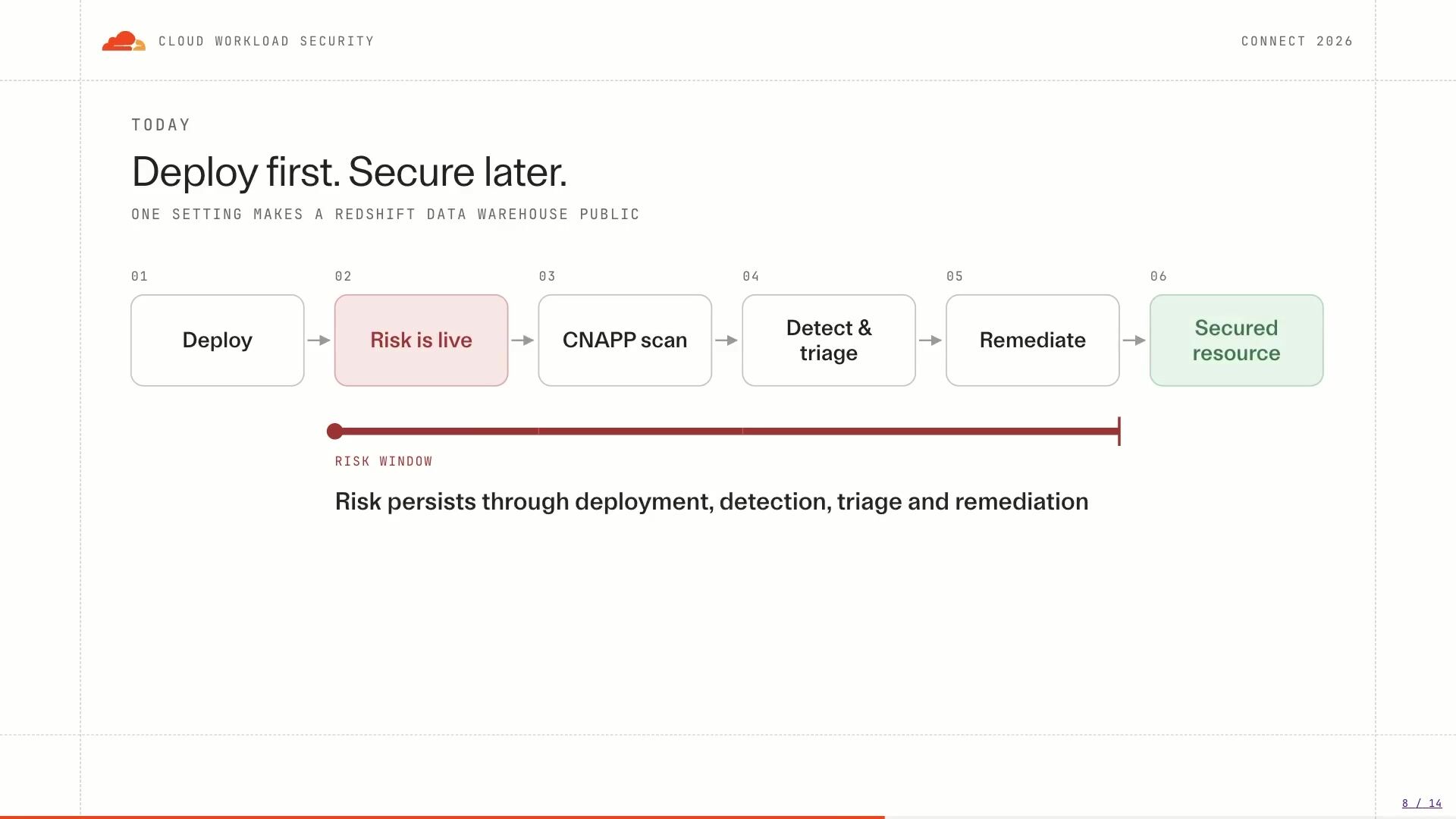
[5:08] So let's look at a typical misconfiguration that gets deployed to AWS, but with something like a CNAP tool in place. Now CNAP, if you're not familiar with the acronym, is a set of tools which is meant to secure and used to secure our cloud environments, but through API scanning and through detective methods. So you may have heard of Prisma Cloud from Palo Alto or Wiz as two popular CNAP products, and this is a typical workflow in the way they operate in detecting misconfiguration. So a developer is going to deploy a Redshift cluster in this example, but accidentally set the one single parameter, which is publicly accessible, to true. When they deploy that, the risk is immediately deployed and live as soon as it hits the cloud provider APIs, and then our risk window has started. Next, our CNAP or CSPM is going to scan that particular resource and identify the risk has been deployed.

[6:01] After that, we get an alert, it's being detected, and we have to go. through the triage process. So who owns that resource? All those questions we had earlier on in the slides, we need to go and find out what is particularly wrong with this resource, who can fix it, and how can we go and remediate that particular risk as soon as possible. Now you'll notice that the risk we know stays live until the remediation happens. Until we redeploy the resource or we fix in place, that risk is exposed and potentially causing our organization an unacceptable risk of critical exposure to the internet. in this circumstance. So the secured resource only exists after we've gone through that remediation process. Now, let's look at the same flow with CWS in place. It's the same developer, same deployment tool, the same APIs, but a different control point.

[6:47] So in this example, we have the proxy sitting in between the developer and the cloud provider APIs. What it's doing is it's inspecting the call as it comes through. It's identified that public access is enabled when it should be disabled. So we've blocked it immediately and provided feedback. to the developer now no risky resource was ever created in this example no request went to the cloud provider apis no public access on that redshift data warehouse has been made live so we've mitigated risk up front which is much better and we've reduced toil on our detections now the other benefit of doing this approach is that we are giving immediate feedback to the developer so they're updating the deployment config in code through their iac so the next deployment is not going to deploy the same misconfiguration again So we've fixed our code, we deploy again, and then it's allowed through with no further blocking from the CWS proxy as that secure control point, and all the resources deployed are secured by default out of the box.

[7:43] So to get started, it's an extremely powerful product with a very extensible policy language. It can do a lot of things, but keeping it simple, let's think about where the low-hanging fruit is with turning detections into preventions. So 80% of the alerts that are triggered are... come from around 5 % of the security rules. And this is some research done by Unit 42, which is part of Palo Alto. And thinking about that, what we can do is look at those recurring findings and start turning them into preventive policies. So if you're finding that your developers are constantly deploying NENEs and, you know, opening up SSH ports to the internet, where they're not encrypting things correctly, where they're not tagging things correctly, all those basic common controls as a source of most of our alerts, we can make those preventive controls. and start reducing the amount of toil detection and risk going into our environments.

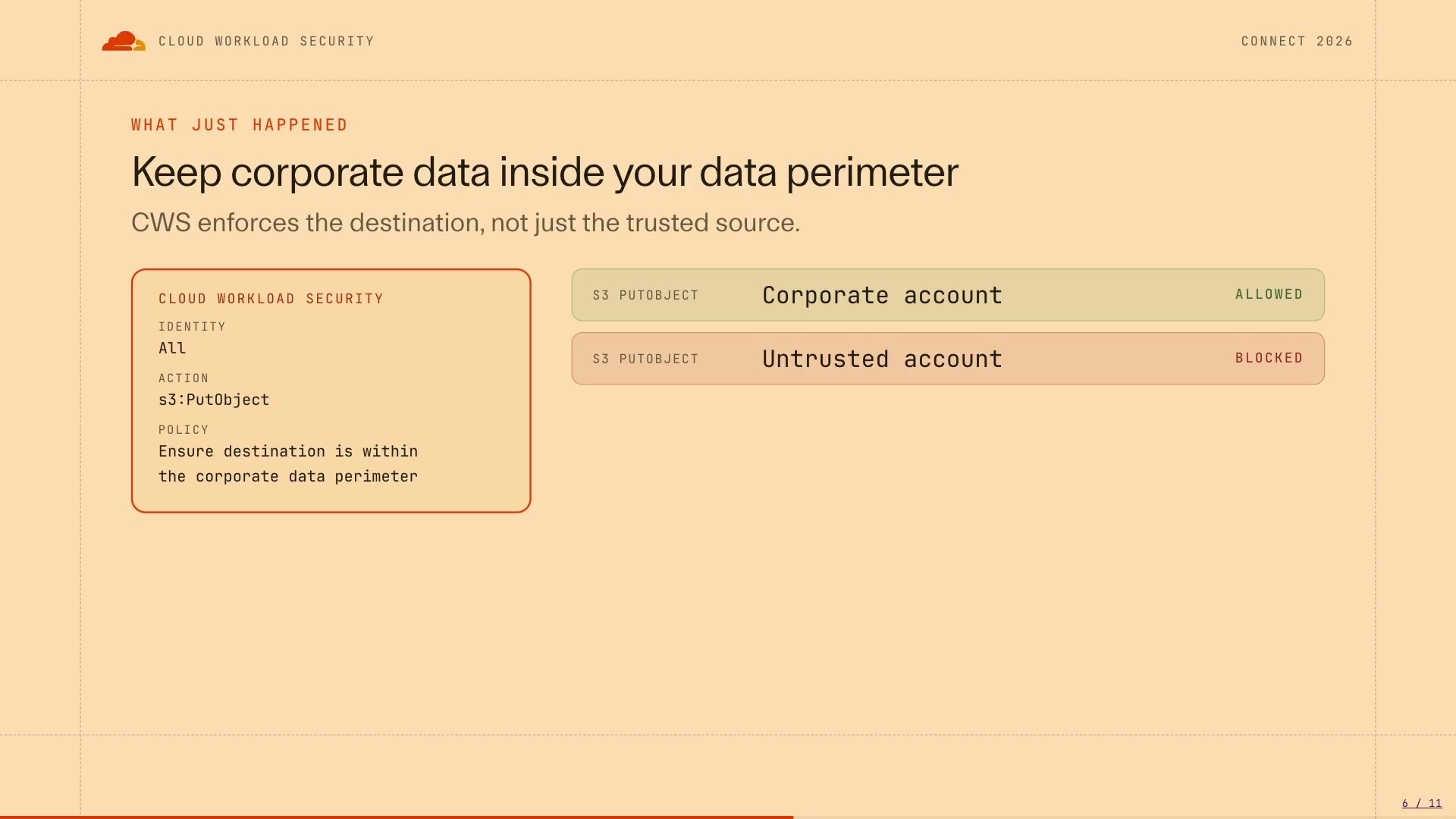
[8:29] So we'll stop those bad actions up front, we'll give the developers the immediate feedback, and we'll start reducing that 80% of alerts that are coming from that small set of security rules. So every prevention is an alert you never have to chase. Let's look at another example. So we've talked about misconfigurations, but as I touched on, the proxy is a lot more powerful with its policy language than just misconfigurations. So this is a common attack vector, which is not as well known compared to some of the other breaches that have happened in AWS. But if we look at something like a corporate S3 bucket that's living within your corporate environment, we have a malicious insider or just a normal user who's got access to read that sensitive data from that corporate S3 bucket. So they've brought that data through a read call down to their device or another workload.

[9:18] Now, what they can do as part of that is now introduce our... personal credentials into the workflow. Everyone has an AWS account or a Cloudflow account or a Google or an Azure account. They bring those personal credentials into the environment and actually use that to put the object into their own personal bucket or personal resource. So in a normal corporate environment, you're going to have firewalls and network filters and proxies. They're going to look at this request and say, hey, we can see a put object to s3 .region .amazonaws .com or any AWS resource for that example. for that matter. What we're not seeing, though, is which account that actual put object is going to or which resource that particular put object is going through. So through CWS, we're able to see which resources are being used as part of an API call and which accounts are associated with those resources as well.

[10:09] So we can actually create an allow list or effectively a data perimeter around your resources to ensure that your . data only stays within your corporate environment so as we look at it here with cws in place instead of allowing that call to go out through our egress filter and that put object going through an external bucket or an untrusted bucket we're actually going to approve check the destination and make sure that it's approved and it's on our allow list before allowing it out so only allowed resources within our corporate perimeter are able to be utilized and have data flow through to them and anytime we introduce personal credentials or external account into the mix we're able to block it through the proxy given that it's in the the egress path and is able to inspect those api calls so we're going a level deeper into what you can control with um our uh cws proxy now we've launched uh cws in beta um and just a couple a day ago it's uh it's been released so you're able to go to developers .cloudflare and look at cloud workload security you can deploy it yourself it's in open beta at the moment and it's So we have some very generous limits on how to use it.

[11:16] And what we've seen customers do with this is deploy it within their environments, put it onto the end of their deployment tools, analyze what traffic is coming through in a monitoring or a log mode just to get a sense of what is actually going through their environment. And then start looking at some of those critical misconfigurations to prevent.

## Related sessions

- [Prevent cloud misconfigurations and data leakage before they happen](https://www.cloudflare.com/connect/2026/session/prevent-cloud-misconfigurations-and-data-leakage-before-they-happen)
- [The integrated Cloudflare stack for trusted AI adoption](https://www.cloudflare.com/connect/2026/session/the-integrated-cloudflare-stack-for-trusted-ai-adoption)
- [5 questions every CTO must answer about AI agents](https://www.cloudflare.com/connect/2026/session/5-questions-every-cto-must-answer-about-ai-agents)

## More from Connect

- [All sessions](https://www.cloudflare.com/connect/)
- [Get notified for Connect 2027](https://www.cloudflare.com/connect#2027)

