Secure AI
Prevent, don’t detect: Introducing Cloud Workload Security

Neil Brown
Cloudflare
As organizations scale AI services and internal tools, the access control surface grows faster than policy can keep up. This session walks through a practical workflow for securing your workforce across applications, browsers, and devices. Organize resources and apply policy at the right level of granularity. Enforce step-up authentication where it matters. Make access time-bound so it expires when the job is done. The focus is on composing controls that work together across the stack without creating configuration sprawl or policy debt. Leave this session with a deployable model for tightening security posture across any workload, AI or otherwise.
0:03Thank you so much for taking the time to be here today. My name is Noelle. I'm a product manager here at Cloudflare. I actually work more on our data security side, a lot on DLP or data loss prevention, as well as working on a new product, our Cloud Workload security product. But my colleague, Ann Ming, couldn't quite make it here today, so I am pinch-hitting a little bit to show you guys some awesome content at the... team is working on. Very, very excited to be talking it through with you. So the two big things we are going to be talking about today are one, independent multi -factor authentication that we've recently added to Access, which we'll dive into and we'll show you a little bit of. And then the other one, which is a very fun one, is that we're going to be launching a new browser extension within Cloudflare Zero Trust.
0:49So we will be talking a little bit about that and all of the features that it will entail. So that's what we're going to be. going over and we're talking about how we can kind of use that to secure your workforce or independent contractors, things like that. So the first thing, independent MFA, you might ask independent of what? So it's independent of your IDP. So if you use Cloudflare Access, you will go over to Access Controls, we'll go to our Applications, and you can connect a whole slew of different types of applications to Cloudflare, and you can manage them with lots of different policies. and they can be very granular policies with lots of different options to them. So we're going to be looking at this atom.internal application. So you can see here, we have the host name of our application.
1:36This is a private application, a little demo app around use of AI within an organization just for fun. And here you can apply lots of different policies for how your organization can interact with this application. So I want to be... very granular in how my users can interact with such a sensitive application. So through access, I connect that application through Cloudflare, and I can write a whole bunch of different policies here. And so here's one of them where we have that you must MFA. So this is not your IDP's use of MFA. So it's not if you go in and have your users log in with their IDP, and there you require, say, either a one-time PIN or any sort of hardware. key this is on top of that so you would connect access to your idp they have to multi -factor there and you're like you know what for some of these applications i don't want to require a second hard key or something like that but for some of these applications i do it's really important that i want to make sure that no one is using those credentials to let an agent get to something i really want to make sure i have that extra layer of security but i want to add it for everything that adds a lot of fatigue if you have to use your hard key for every application Sometimes they aren't really worth it, or sometimes you don't even want to put it in front of it.
2:51Say like an Ask IT type of application, you don't necessarily want to be making it harder to access when your users are debugging or something like that. So here for this particular application, we do require an additional MFA, and that will come up through Cloudflare. So then Cloudflare is going in, and it's basically saying, if we go here, we'll say must MFA. So we have this particular policy here that we're adding. We had it today. this application. So my Atom.internal app is going to require MFA. And you have all the different options here for this application. But one of them is that I'm going to require a security key. So every time that someone goes to access this internal application, in addition to everything they have to do through any sort of IDP, Cloudflare is also going to require MFA. So this is a great way to kind of make sure this is a human because they have to actually touch their hard key to make sure that you're getting access.
3:42So if there's any sort of competition. credentials, you're adding one more layer of depth that Cloudflare is requiring for this application. So if I were to go over here, we're going to test this out, and I'm going to go over my launcher, and here you can see I have my two applications here, and if I go to click myatom .internal, it's showing, so here I'm touching my hard key, and that is going to give me access to this application. So here we have our nice little AI. application from AcmeCorp. So there's just one more way that you can add security to your internal applications is just by adding that hard T requirement. So it's just a layer that we really are excited about that customers can add. And again, you can make this very granular policies. We had a policy that said only Ann Ming and Noel could have to use MFA, potentially because you're more concerned about those users. You can do it per application.
4:32You can do it per group. So that is a really cool way that we're excited to just sort of add security for our So, the next thing that we are also going to be talking and showing off just a little bit today is around the browser extension. So, many of our customers, the way that they actually deploy and connect their employee traffic to Cloudflare is they use the Cloudflare One client. routes all of your machine traffic up to Cloudflare so you can apply policies. And you can do things like split tunneling if you want to split off specific traffic. But it is still a client. designed to route up all the traffic and that's not always great for use cases where it's byod or you have like a temporary contractor and you have situations where they don't want to be sending all of the traffic up but they still want access to your particular internal uh tools say we'll say adam .internal things like that like specific applications you want to give access to um and again the client isn't so great for all that um for those use cases And so I'm going to hear, I'm going to, I'm going to pause our client and we're going to go back to our, we're going to go back to our app launcher.
5:45And now I don't, I'm not routing my traffic up to Cloudflare. I went and paused it. So now I'm just over the internet. I'm not coming from my internal network. I'm not routed through Cloudflare. I don't have the security of that client. So if I were to try and access my, my Atom .internal application now, it's gone. Like, there's no more secure connection. Cloudflare is saying, hey, wait a minute, you're not coming from somewhere secure. I'm not letting you get access to that very specific application. I don't want you touching that unless you're coming through Cloudflare. My security policies have been applied to you. And so, what do I want to do? I can't use the client. I need to get access to this application. What is a way that we can give more users access without having to sort of route up so much traffic? And so here, the new browser.
6:33will give us a way that the customer can just add this browser extension and be able to turn it on and apply it only when they need it. So here we have a little disconnected, but now if I go back and I click Connect, and you can see here, as I show here, I am connected to that same corporation, that ACE M corporation. And now if I launch my launcher again,
6:58now my Atom.internal is back. So this is a way for me to just turn on that traffic routing just through my browser. And people are very excited about this because it's such an easy way to say, I want to give access to contractors or I want to give access for these specific things. And I don't want to use all of this traffic routing. I just want to use the extension. And so there's going to be, and this is pieces that we're building on right now. Here, let me open up. I'll open up these traffic controls. And so a lot of people are curious, how is this going to work? this going to look like? This is a brand new feature. It is going to be coming out in Q4 of this year. So it's going to be coming out in the next few weeks, next few months. And so people are really curious about it. So I'm going to talk a little bit about what's coming. Not all of this is actually even in the dashboard yet, but a lot of people are very sort of curious about it.
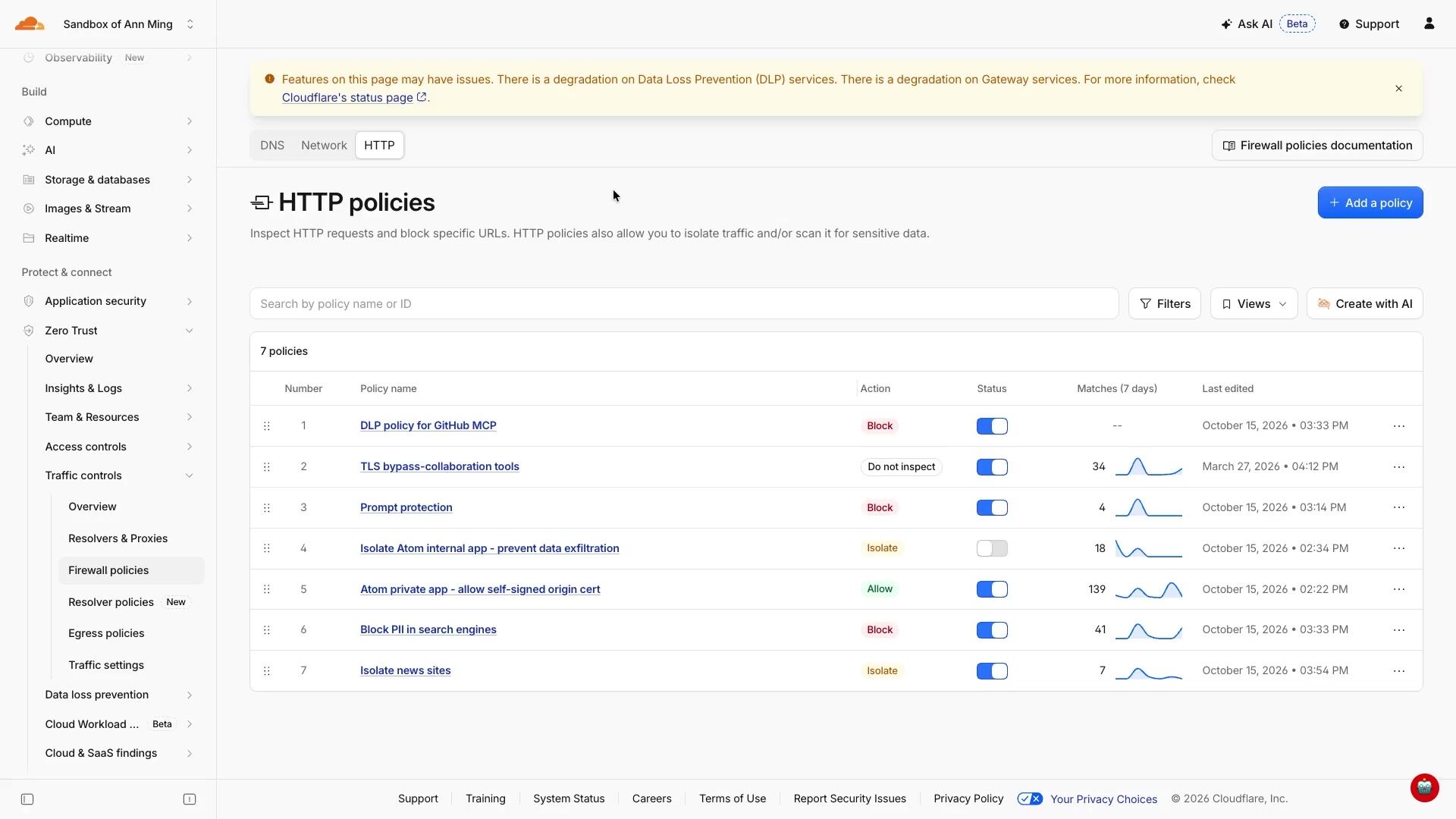
7:46So here right now, if I go over to these firewall policies, we have the DNS, the network and the HTTP policies. Policies will still be all applied, which will start to play with in a moment so that you can still apply all of the security policies to the traffic that goes through the browser. It is basically just another on -ramp of traffic to Cloudflare. So we want to make it so that there's no cost to it. There's not any sort of specific ways that we're guarding it. We want to give this to all of our customers who are either using the client or any other way that they want to ramp their traffic up to Cloudflare security. You can do that. And then we're going to be adding a new little policy builder here and it'll give you even more features that you can start applying to your customers uh your users experience um a really big one is going to be things like nudging them if they were to start to go to a site and you don't want them to quite go to that site but you don't actually have the rights to block yet in your organization and you're still trying to figure out who's using what and you don't want to start affecting with harsh security policy what you can start doing is giving little nudges like hey you shouldn't quite be going here i will for now but i'm going to let you know that this isn't actually within policy and you should start using these other applications because that's a lot of ways to sort of soft launch hey we're going to be blocking these sites hey we're going to be removing this access there's so there's going to be a lot of things like that that where you can start nudging your users on hey you shouldn't be going to this site um and you will be able to start drawing all of those policies up and then again that is coming just later this quarter it's very exciting to do the other piece is that again
9:20it is still applies all of the other policies that you want to be able to apply to your organization so that can be data loss prevention that can be your ai prompt protection so all of those features that you still want we can still apply so we're just going to play with that just a little bit to kind of see it through the browser so if we go back here you see that again we're connected through this browser and if i were to go here and well actually i'll make sure i show you the policy here we're going to isolate new sites This is just a little policy I wanted to show just to show that this is a security policy you can use. So here, this is our browser isolation as well. And what this does is it gives you a way to apply certain security policies within your browser as well, in addition to the browser extension where you can limit interactivity with a specific site.
10:13So if we go in here and we click edit. You can apply isolation to a specific content category. So here we have news and media. You can do it for specific identities if you wanted. So if you only wanted to apply certain protections to a specific user group or a specific set of users or maybe flagged users, anything that you want, you can pick identities. Or you can pick specific posture conditions if you want to use your device client. And then you can start running lots of different little features here if you want. you will pick. This one's active. Oh, here. But then the other big security thing that you can do is the copy to clipboard, blocking paste, blocking copies, blocking screenshots, lots of things you want to do to actually monitor within the specific application. So say you have a user that you're a little bit worried about in what they're doing and you want to be watching out if they are copying pasting information to and from a site that you don't necessarily want them to, you can be able to put on those.
11:13controls as well. And all of that can be through the extension so that you don't require again, like, hey, you need to have the client. It has to route up all the traffic. Maybe it's just a contractor. You want to give them access, but when they have access, you want to make sure that you're also applying the security policy. So you're saying, hey, I'm giving you this access, but if you try to copy something out, you're not going to get access to that. You're not going to be allowed to do that. Or, hey, if you want to start pasting into something into it that you shouldn't be, we can also block that. So we'll also see just how sleek that is. So if we go here, we isolated news sites. So we'll just go to CNN.com. This is a very common site that we pick for showing off some of our browser capabilities just because CNN has a lot going on. There's a lot loading. There's a lot of different pieces here.
11:59And so we wanted to show all those different pieces and how they do continue to work even with the isolated browser. But if I click, you can see that this little, this bar is not the same as your state. interactive page here you're seeing a very sort of limited set of use of uses within the browser so here you can see like the accessibility you can still print if you want to because we allowed it in those controls but it is an isolated page so it's being routed all of this traffic is being routed up to cloudflare cloudflare is applying the security policy and and you can control the traffic through that But if I, and we'll show you again, here we'll turn off, we'll turn off our browser extension here.
12:45Very easy to do. And if we were to close that, we were to run back to CNN.com. Here you can see this is back to my standard tool selector here. So now I've turned off that browser extension. I am not routing my traffic up to Cloudflare. I'm no longer applying the security policies. And that's how easy it is. ability to very quickly toggle on, hey, I need to connect to Cloudflare. I need to connect to this organization. And because I'm going to be a contractor, I'm going to be accessing this particular site that you want to give me access to. I can turn it on. I can apply all those policies to my traffic, but then I can also just turn it off and I don't have to do everything all the way up. It's not inspecting all of the traffic that isn't necessary given contractors, small use cases. So those are some pieces where we're definitely sort of very.
13:34excited about. And then I'll also show while we're here, if we go back to some of the firewall policies, other things that you can do is things like prompt protection.
13:45So here, again, this is just a little example of policy that we have. So here, if someone, if you wanted to give access to, say, an AI application, but you wanted to require them to access through the browser, then you can do things like if it's chat GPT. google gemini or any of these sources then you can put in a dlp profile for specific ai prompt protections um and again so then you can sort of log payloads you can all add all these security features and these are all things that are going to be required again you turn on that browser extension or through the client or any other on ramp for from cloudflare and you start applying these security policies right on your traffic um and this is all the sort of the same things here and you can even select if you really want to you can select which sources you want apply it to. So if you're using, say, the client, or you're using the browser, or you're using proxy endpoints, you can apply all of these policies as you want.
14:35So we are very excited about this new one that we're going to be adding in the browser extension, but we have lots more. I don't want to not hype these as well. Thank you for coming. Thank you for listening. I appreciate it.
Neil Brown
Cloudflare
Simon Thorpe
Cloudflare
AJ Gerstenhaber
Cloudflare
Be the first to know when registration opens and the agenda goes live.
---
title: "Securing your workforce for the AI era"
url: "https://www.cloudflare.com/connect/2026/session/securing-your-workforce-for-the-ai-era"
year: 2026
---

# Securing your workforce for the AI era

[Watch session](https://www.cloudflare.com/connect/2026/session/securing-your-workforce-for-the-ai-era)

## Session details

- **Track:** Secure AI
- **Topics:** Security modernization & zero trust
- **Solution areas:** SASE & Workspace Security (Cloudflare One)

## About this session

As organizations scale AI services and internal tools, the access control surface grows faster than policy can keep up. This session walks through a practical workflow for securing your workforce across applications, browsers, and devices. Organize resources and apply policy at the right level of granularity. Enforce step-up authentication where it matters. Make access time-bound so it expires when the job is done. The focus is on composing controls that work together across the stack without creating configuration sprawl or policy debt. Leave this session with a deployable model for tightening security posture across any workload, AI or otherwise.

## Speakers

- [Noelle Kagan](https://www.cloudflare.com/connect/speakers/2623046) — Senior Product Manager, Cloudflare

## Transcript

[0:03] Thank you so much for taking the time to be here today. My name is Noelle. I'm a product manager here at Cloudflare. I actually work more on our data security side, a lot on DLP or data loss prevention, as well as working on a new product, our Cloud Workload security product. But my colleague, Ann Ming, couldn't quite make it here today, so I am pinch-hitting a little bit to show you guys some awesome content at the... team is working on. Very, very excited to be talking it through with you. So the two big things we are going to be talking about today are one, independent multi -factor authentication that we've recently added to Access, which we'll dive into and we'll show you a little bit of. And then the other one, which is a very fun one, is that we're going to be launching a new browser extension within Cloudflare Zero Trust.

[0:49] So we will be talking a little bit about that and all of the features that it will entail. So that's what we're going to be. going over and we're talking about how we can kind of use that to secure your workforce or independent contractors, things like that. So the first thing, independent MFA, you might ask independent of what? So it's independent of your IDP. So if you use Cloudflare Access, you will go over to Access Controls, we'll go to our Applications, and you can connect a whole slew of different types of applications to Cloudflare, and you can manage them with lots of different policies. and they can be very granular policies with lots of different options to them. So we're going to be looking at this atom.internal application. So you can see here, we have the host name of our application.

[1:36] This is a private application, a little demo app around use of AI within an organization just for fun. And here you can apply lots of different policies for how your organization can interact with this application. So I want to be... very granular in how my users can interact with such a sensitive application. So through access, I connect that application through Cloudflare, and I can write a whole bunch of different policies here. And so here's one of them where we have that you must MFA. So this is not your IDP's use of MFA. So it's not if you go in and have your users log in with their IDP, and there you require, say, either a one-time PIN or any sort of hardware. key this is on top of that so you would connect access to your idp they have to multi -factor there and you're like you know what for some of these applications i don't want to require a second hard key or something like that but for some of these applications i do it's really important that i want to make sure that no one is using those credentials to let an agent get to something i really want to make sure i have that extra layer of security but i want to add it for everything that adds a lot of fatigue if you have to use your hard key for every application Sometimes they aren't really worth it, or sometimes you don't even want to put it in front of it.

[2:51] Say like an Ask IT type of application, you don't necessarily want to be making it harder to access when your users are debugging or something like that. So here for this particular application, we do require an additional MFA, and that will come up through Cloudflare. So then Cloudflare is going in, and it's basically saying, if we go here, we'll say must MFA. So we have this particular policy here that we're adding. We had it today. this application. So my Atom.internal app is going to require MFA. And you have all the different options here for this application. But one of them is that I'm going to require a security key. So every time that someone goes to access this internal application, in addition to everything they have to do through any sort of IDP, Cloudflare is also going to require MFA. So this is a great way to kind of make sure this is a human because they have to actually touch their hard key to make sure that you're getting access.

[3:42] So if there's any sort of competition. credentials, you're adding one more layer of depth that Cloudflare is requiring for this application. So if I were to go over here, we're going to test this out, and I'm going to go over my launcher, and here you can see I have my two applications here, and if I go to click myatom .internal, it's showing, so here I'm touching my hard key, and that is going to give me access to this application. So here we have our nice little AI. application from AcmeCorp. So there's just one more way that you can add security to your internal applications is just by adding that hard T requirement. So it's just a layer that we really are excited about that customers can add. And again, you can make this very granular policies. We had a policy that said only Ann Ming and Noel could have to use MFA, potentially because you're more concerned about those users. You can do it per application.

[4:32] You can do it per group. So that is a really cool way that we're excited to just sort of add security for our So, the next thing that we are also going to be talking and showing off just a little bit today is around the browser extension. So, many of our customers, the way that they actually deploy and connect their employee traffic to Cloudflare is they use the Cloudflare One client. routes all of your machine traffic up to Cloudflare so you can apply policies. And you can do things like split tunneling if you want to split off specific traffic. But it is still a client. designed to route up all the traffic and that's not always great for use cases where it's byod or you have like a temporary contractor and you have situations where they don't want to be sending all of the traffic up but they still want access to your particular internal uh tools say we'll say adam .internal things like that like specific applications you want to give access to um and again the client isn't so great for all that um for those use cases And so I'm going to hear, I'm going to, I'm going to pause our client and we're going to go back to our, we're going to go back to our app launcher.

[5:45] And now I don't, I'm not routing my traffic up to Cloudflare. I went and paused it. So now I'm just over the internet. I'm not coming from my internal network. I'm not routed through Cloudflare. I don't have the security of that client. So if I were to try and access my, my Atom .internal application now, it's gone. Like, there's no more secure connection. Cloudflare is saying, hey, wait a minute, you're not coming from somewhere secure. I'm not letting you get access to that very specific application. I don't want you touching that unless you're coming through Cloudflare. My security policies have been applied to you. And so, what do I want to do? I can't use the client. I need to get access to this application. What is a way that we can give more users access without having to sort of route up so much traffic? And so here, the new browser.

[6:33] will give us a way that the customer can just add this browser extension and be able to turn it on and apply it only when they need it. So here we have a little disconnected, but now if I go back and I click Connect, and you can see here, as I show here, I am connected to that same corporation, that ACE M corporation. And now if I launch my launcher again,

[6:58] now my Atom.internal is back. So this is a way for me to just turn on that traffic routing just through my browser. And people are very excited about this because it's such an easy way to say, I want to give access to contractors or I want to give access for these specific things. And I don't want to use all of this traffic routing. I just want to use the extension. And so there's going to be, and this is pieces that we're building on right now. Here, let me open up. I'll open up these traffic controls. And so a lot of people are curious, how is this going to work? this going to look like? This is a brand new feature. It is going to be coming out in Q4 of this year. So it's going to be coming out in the next few weeks, next few months. And so people are really curious about it. So I'm going to talk a little bit about what's coming. Not all of this is actually even in the dashboard yet, but a lot of people are very sort of curious about it.

[7:46] So here right now, if I go over to these firewall policies, we have the DNS, the network and the HTTP policies. Policies will still be all applied, which will start to play with in a moment so that you can still apply all of the security policies to the traffic that goes through the browser. It is basically just another on -ramp of traffic to Cloudflare. So we want to make it so that there's no cost to it. There's not any sort of specific ways that we're guarding it. We want to give this to all of our customers who are either using the client or any other way that they want to ramp their traffic up to Cloudflare security. You can do that. And then we're going to be adding a new little policy builder here and it'll give you even more features that you can start applying to your customers uh your users experience um a really big one is going to be things like nudging them if they were to start to go to a site and you don't want them to quite go to that site but you don't actually have the rights to block yet in your organization and you're still trying to figure out who's using what and you don't want to start affecting with harsh security policy what you can start doing is giving little nudges like hey you shouldn't quite be going here i will for now but i'm going to let you know that this isn't actually within policy and you should start using these other applications because that's a lot of ways to sort of soft launch hey we're going to be blocking these sites hey we're going to be removing this access there's so there's going to be a lot of things like that that where you can start nudging your users on hey you shouldn't be going to this site um and you will be able to start drawing all of those policies up and then again that is coming just later this quarter it's very exciting to do the other piece is that again

[9:20] it is still applies all of the other policies that you want to be able to apply to your organization so that can be data loss prevention that can be your ai prompt protection so all of those features that you still want we can still apply so we're just going to play with that just a little bit to kind of see it through the browser so if we go back here you see that again we're connected through this browser and if i were to go here and well actually i'll make sure i show you the policy here we're going to isolate new sites This is just a little policy I wanted to show just to show that this is a security policy you can use. So here, this is our browser isolation as well. And what this does is it gives you a way to apply certain security policies within your browser as well, in addition to the browser extension where you can limit interactivity with a specific site.

[10:13] So if we go in here and we click edit. You can apply isolation to a specific content category. So here we have news and media. You can do it for specific identities if you wanted. So if you only wanted to apply certain protections to a specific user group or a specific set of users or maybe flagged users, anything that you want, you can pick identities. Or you can pick specific posture conditions if you want to use your device client. And then you can start running lots of different little features here if you want. you will pick. This one's active. Oh, here. But then the other big security thing that you can do is the copy to clipboard, blocking paste, blocking copies, blocking screenshots, lots of things you want to do to actually monitor within the specific application. So say you have a user that you're a little bit worried about in what they're doing and you want to be watching out if they are copying pasting information to and from a site that you don't necessarily want them to, you can be able to put on those.

[11:13] controls as well. And all of that can be through the extension so that you don't require again, like, hey, you need to have the client. It has to route up all the traffic. Maybe it's just a contractor. You want to give them access, but when they have access, you want to make sure that you're also applying the security policy. So you're saying, hey, I'm giving you this access, but if you try to copy something out, you're not going to get access to that. You're not going to be allowed to do that. Or, hey, if you want to start pasting into something into it that you shouldn't be, we can also block that. So we'll also see just how sleek that is. So if we go here, we isolated news sites. So we'll just go to CNN.com. This is a very common site that we pick for showing off some of our browser capabilities just because CNN has a lot going on. There's a lot loading. There's a lot of different pieces here.

[11:59] And so we wanted to show all those different pieces and how they do continue to work even with the isolated browser. But if I click, you can see that this little, this bar is not the same as your state. interactive page here you're seeing a very sort of limited set of use of uses within the browser so here you can see like the accessibility you can still print if you want to because we allowed it in those controls but it is an isolated page so it's being routed all of this traffic is being routed up to cloudflare cloudflare is applying the security policy and and you can control the traffic through that But if I, and we'll show you again, here we'll turn off, we'll turn off our browser extension here.

[12:45] Very easy to do. And if we were to close that, we were to run back to CNN.com. Here you can see this is back to my standard tool selector here. So now I've turned off that browser extension. I am not routing my traffic up to Cloudflare. I'm no longer applying the security policies. And that's how easy it is. ability to very quickly toggle on, hey, I need to connect to Cloudflare. I need to connect to this organization. And because I'm going to be a contractor, I'm going to be accessing this particular site that you want to give me access to. I can turn it on. I can apply all those policies to my traffic, but then I can also just turn it off and I don't have to do everything all the way up. It's not inspecting all of the traffic that isn't necessary given contractors, small use cases. So those are some pieces where we're definitely sort of very.

[13:34] excited about. And then I'll also show while we're here, if we go back to some of the firewall policies, other things that you can do is things like prompt protection.

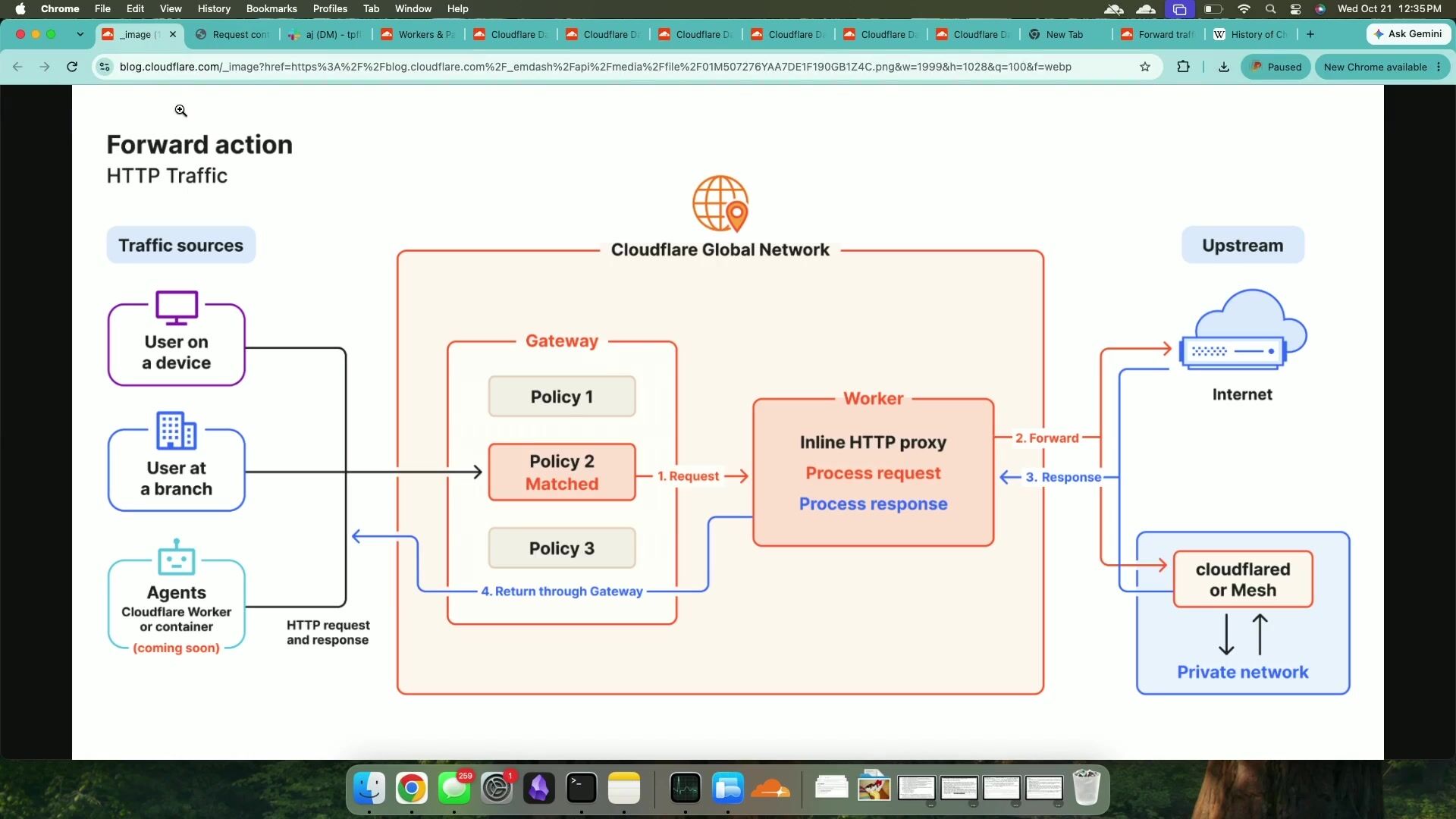
[13:45] So here, again, this is just a little example of policy that we have. So here, if someone, if you wanted to give access to, say, an AI application, but you wanted to require them to access through the browser, then you can do things like if it's chat GPT. google gemini or any of these sources then you can put in a dlp profile for specific ai prompt protections um and again so then you can sort of log payloads you can all add all these security features and these are all things that are going to be required again you turn on that browser extension or through the client or any other on ramp for from cloudflare and you start applying these security policies right on your traffic um and this is all the sort of the same things here and you can even select if you really want to you can select which sources you want apply it to. So if you're using, say, the client, or you're using the browser, or you're using proxy endpoints, you can apply all of these policies as you want.

[14:35] So we are very excited about this new one that we're going to be adding in the browser extension, but we have lots more. I don't want to not hype these as well. Thank you for coming. Thank you for listening. I appreciate it.

## Related sessions

- [Prevent, don’t detect: Introducing Cloud Workload Security](https://www.cloudflare.com/connect/2026/session/prevent-dont-detect-introducing-cloud-workload-security)
- [The integrated Cloudflare stack for trusted AI adoption](https://www.cloudflare.com/connect/2026/session/the-integrated-cloudflare-stack-for-trusted-ai-adoption)
- [Bring your own logic with a fully programmable, secure web gateway](https://www.cloudflare.com/connect/2026/session/bring-your-own-logic-with-a-fully-programmable-secure-web-gateway)

## More from Connect

- [All sessions](https://www.cloudflare.com/connect/)
- [Get notified for Connect 2027](https://www.cloudflare.com/connect#2027)

